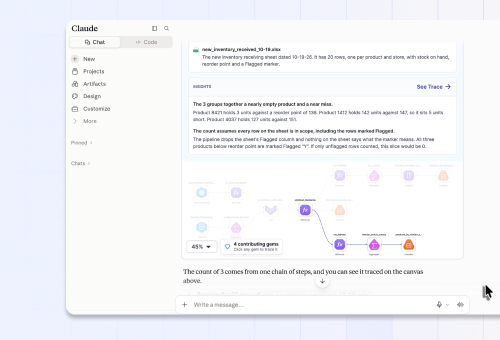

Have you tried analyzing data in Claude or ChatGPT lately? Maybe you’ve dropped in a few Excel files or PDF exports, asked for a reconciliation, and you've gotten a solid first answer in minutes. It's impressive.
Then month-end comes around again, and that answer lives in one specific chat. You can't see how it got to that number, so you can't check it. And it forgot the allocation rule you walked it through last time.
Even if Claude or ChatGPT shows you the code, you'd need to read Python to know what you're looking for, so you’re stuck without the ability to audit the work. Without a reusable asset, you start all over again the following month.
Today we're launching Prophecy DataGPT, so you can stay in chat for your data work without starting over every time. It's built for the business analysts who do the work, and it integrates with the cloud data platform your data team already manages. Bring Prophecy DataGPT into Claude, ChatGPT, and Microsoft Copilot, or access it directly through the Prophecy web app.
Ask for a reconciliation, report, or dashboard in plain language, inside the AI app you use every day. DataGPT does the work from your raw, messy data, and it fixes what's missing:
- You see every step. Each result comes back with a visual workflow backed by open code in chat, so you can check the numbers before anyone else does.
- It remembers what your team knows. Approve a rule once, and every future request, from you or a teammate, starts from it.
- It runs again next month. The result publishes as a governed workflow on Snowflake, Databricks, or BigQuery, reviewed by your data team and rerun on schedule. You can even opt to run it on Prophecy’s own in-memory data warehouse if you choose.
Data work turns raw data into informed business decisions
Data work is the preparation, reconciliation, analysis, and reporting that turn raw data into governed reports, dashboards, and reusable data products.
It can look like this:
- Finance: Reconcile a general ledger against bank statements and subledgers for month-end close
- Tax: Prepare tax provision workpapers by bringing trial balances into the required tax reporting structure
- Customer Onboarding: Map and harmonize a new customer’s data into the company’s standard data model
- Marketing: Determine which campaigns actually generated pipeline by reconciling ad-platform, web, and CRM data
- Customer Success: Identify accounts at risk by combining product usage, support activity, renewals, and account-plan data
- Supply Chain: Explain inventory shortages by combining demand forecasts, purchase orders, inventory, and shipment data
- HR / Workforce: Reconcile headcount, compensation, and organizational data across HR, finance, and planning systems
- Sales Operations: Reconcile bookings, billings, and CRM opportunities to determine true sales performance and forecast accuracy
This work rarely starts from clean, modeled data. It starts from multi-tab spreadsheets with merged headers, PDF statements, and system exports that were never designed to agree. In most enterprises, someone still does it by hand in spreadsheets and desktop tools. Or it waits in a data team backlog.
DataGPT is built specifically for this work. It starts from messy inputs, finishes with a governed result, and keeps every step visible along the way.
How DataGPT works: messy data in, governed outcomes out
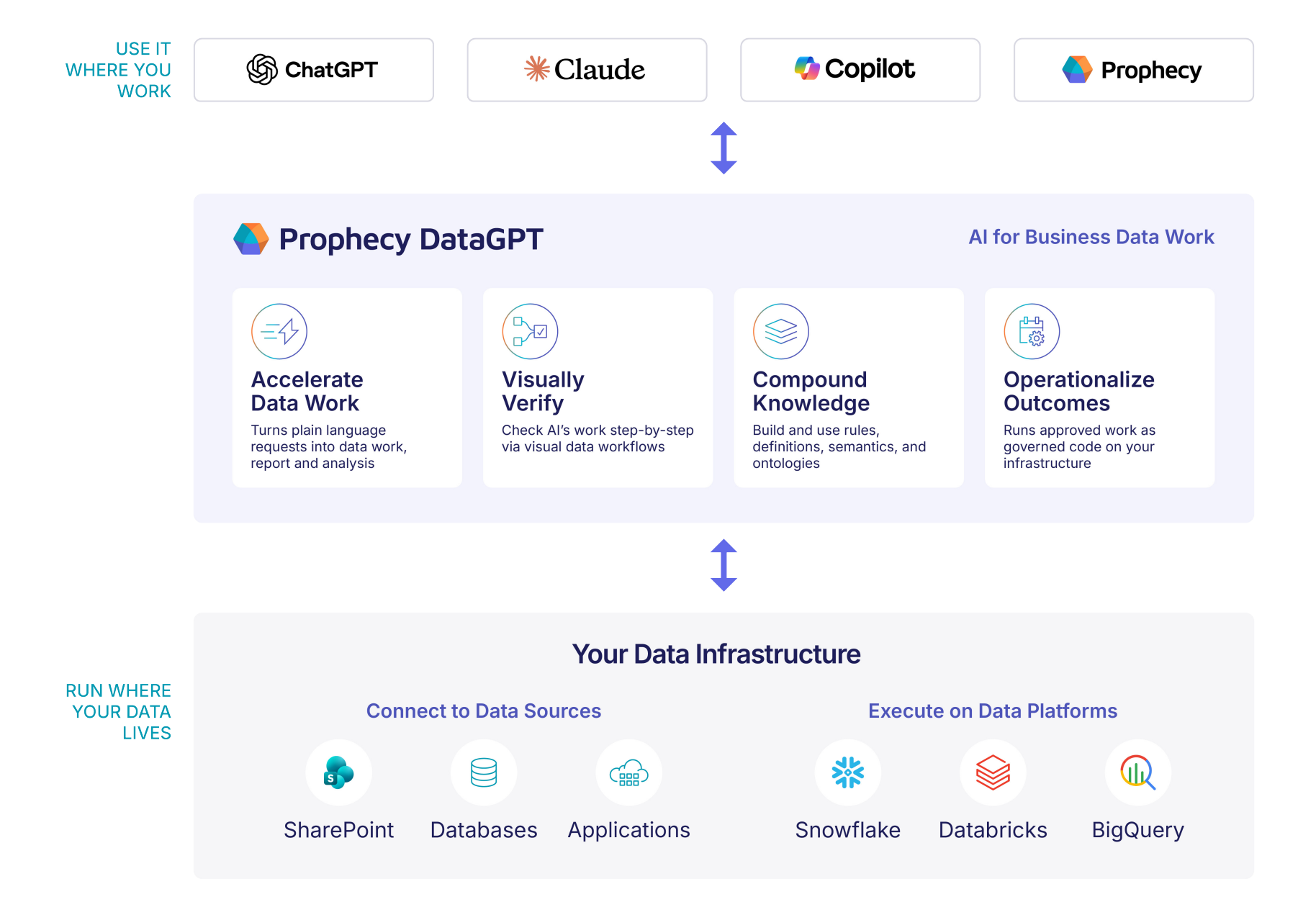
Start where you want to work
Use ChatGPT, Claude, or Microsoft Copilot, and DataGPT shows its workflows, code, and results right in the conversation. If you don’t use one of these AI apps at your organization yet, you can use the Prophecy web app for the same experience, with the full visual workflow side by side. Wherever you start, the work lands in the same governed place.
1. Accelerate your data work
A master agent orchestrates a team of specialist agents. One turns a plain-language request into compute steps, another maps a new dataset to your standard model, and a third writes the documentation. You describe the result you need; DataGPT handles the cleaning, matching, joins, and calculations, and you keep the judgment calls.
2. Visually verify every step
Every answer comes back with the visual workflow behind it in conversation. Click into any step to see its inputs, its logic, and the data at that point, then open the code underneath. Something off? Say so in plain language and the workflow updates. It's all backed by open code in Git, so your data team can review it like anything else they ship.
3. Compound what your team knows
Most AI starts every chat from zero. Prophecy starts from what your company knows: the definitions, rules, and catalogs your teams have built. It turns them into a knowledge graph that grounds the agent and grows with every workflow your team approves. Confirm a fiscal calendar or an allocation method once, and every future request starts from it.
4. Operationalize the outcome
Approved workflows run as deterministic, scheduled code, with no prompts to the model each time. Your data platform does the heavy processing, so you save time and AI tokens, and results stay predictable. Results deliver wherever they need to go: Excel and CSV files, PDF reports, ERP and CRM exports, SharePoint, and warehouse tables.
Where it runs
The work runs natively on Snowflake, Databricks, or BigQuery, in your own infrastructure and inside the access controls you already have. You can also start on a Prophecy-managed in-memory data warehouse for quick processing. The AI sees metadata, never your rows, and there's no separate engine or proprietary format to manage.
From open task to scheduled process, in one conversation
Take an analyst preparing a customer revenue audit. Here's how she uses DataGPT in her AI app of choice, Claude. No DIY scripts in a chat window, and no bouncing between a legacy tool and her AI.
First, she opens Claude, which pulls her open tasks from the project board: complete the outstanding audit. DataGPT checks the audit file list against what's in SharePoint, Snowflake, and Databricks, and flags the one file that's missing in an easy-to-understand chart.
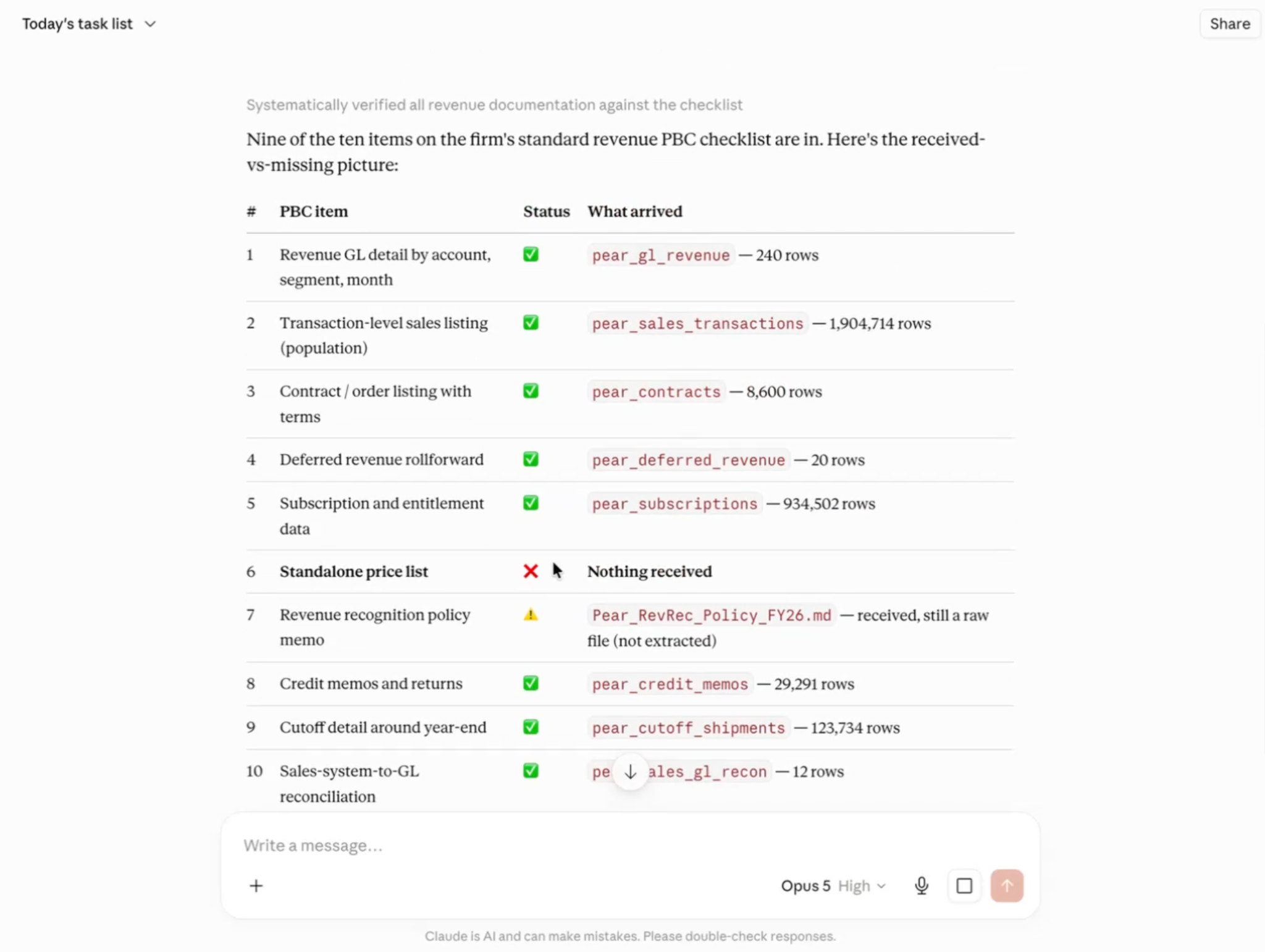
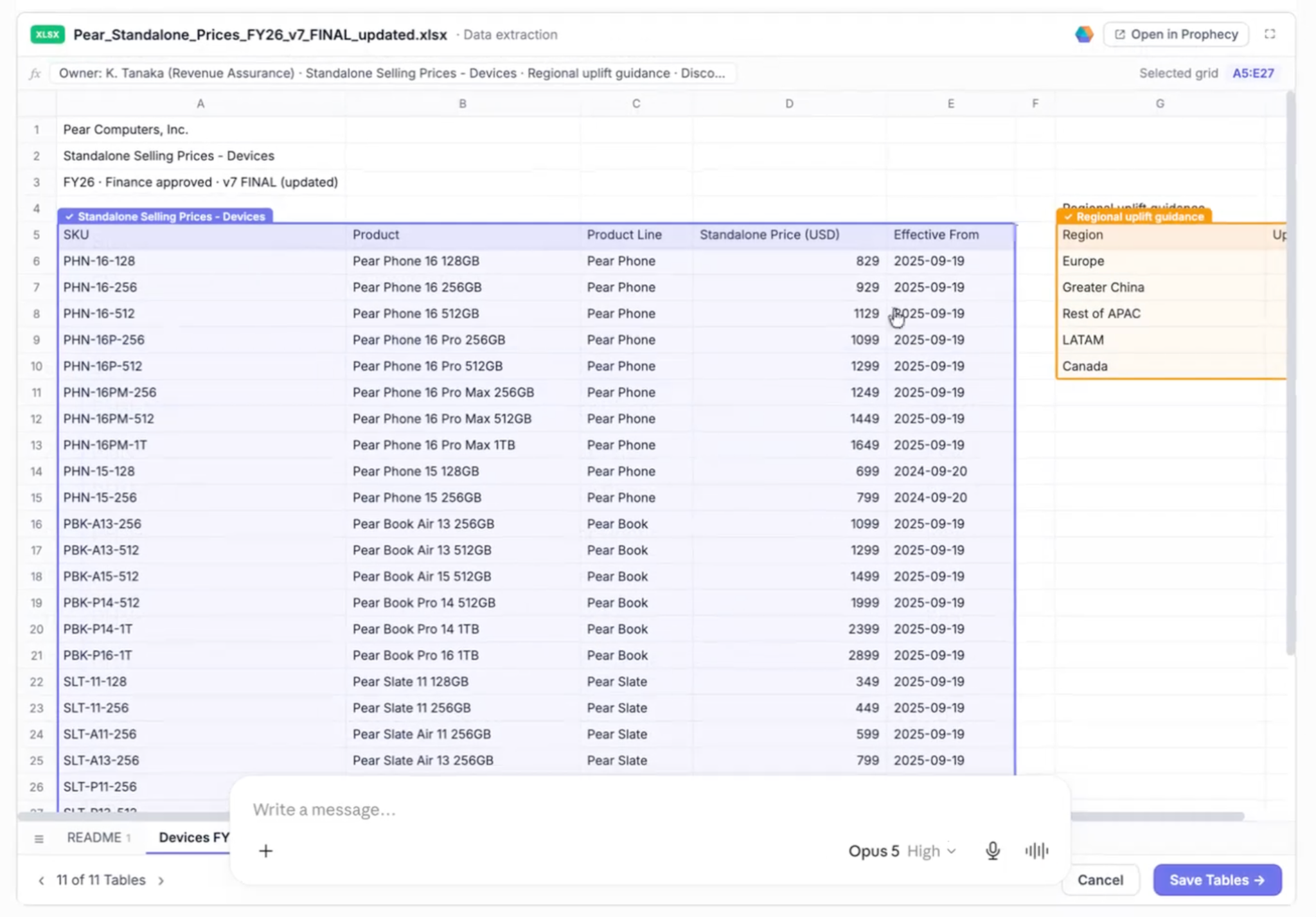
She uploads the missing Excel workbook. It goes straight into Prophecy from DataGPT. That matters to her for two reasons: her customer's revenue data stays out of chat histories, and the AI model only ever sees metadata. For convenience sake, this file doesn't have to fit in the conversation, so a 40-tab workbook works as well as a small CSV.
DataGPT then detects the tabs and tables, cleans them up, and saves them as governed tables on her organization’s Snowflake environment, ready to reuse next month.
Now, she wants to ask for the revenue analysis. It comes back with text answers in chat, but she doesn't trust a number until she sees the work behind it. One click returns the visual workflow: every read, join, and calculation, the data at each step, and the code underneath. She doesn't need to read the code. She knows the business, so she can use that context to spot a wrong join or a missing customer and audit the result before it goes to her team.

As she digs in, DataGPT also flags something nobody told it to check for. The company sells discounted bundles but only has list prices. She asks how to handle it, and DataGPT proposes common allocation methods. She picks proportional standalone selling price (SSP), and the workflow automatically updates.
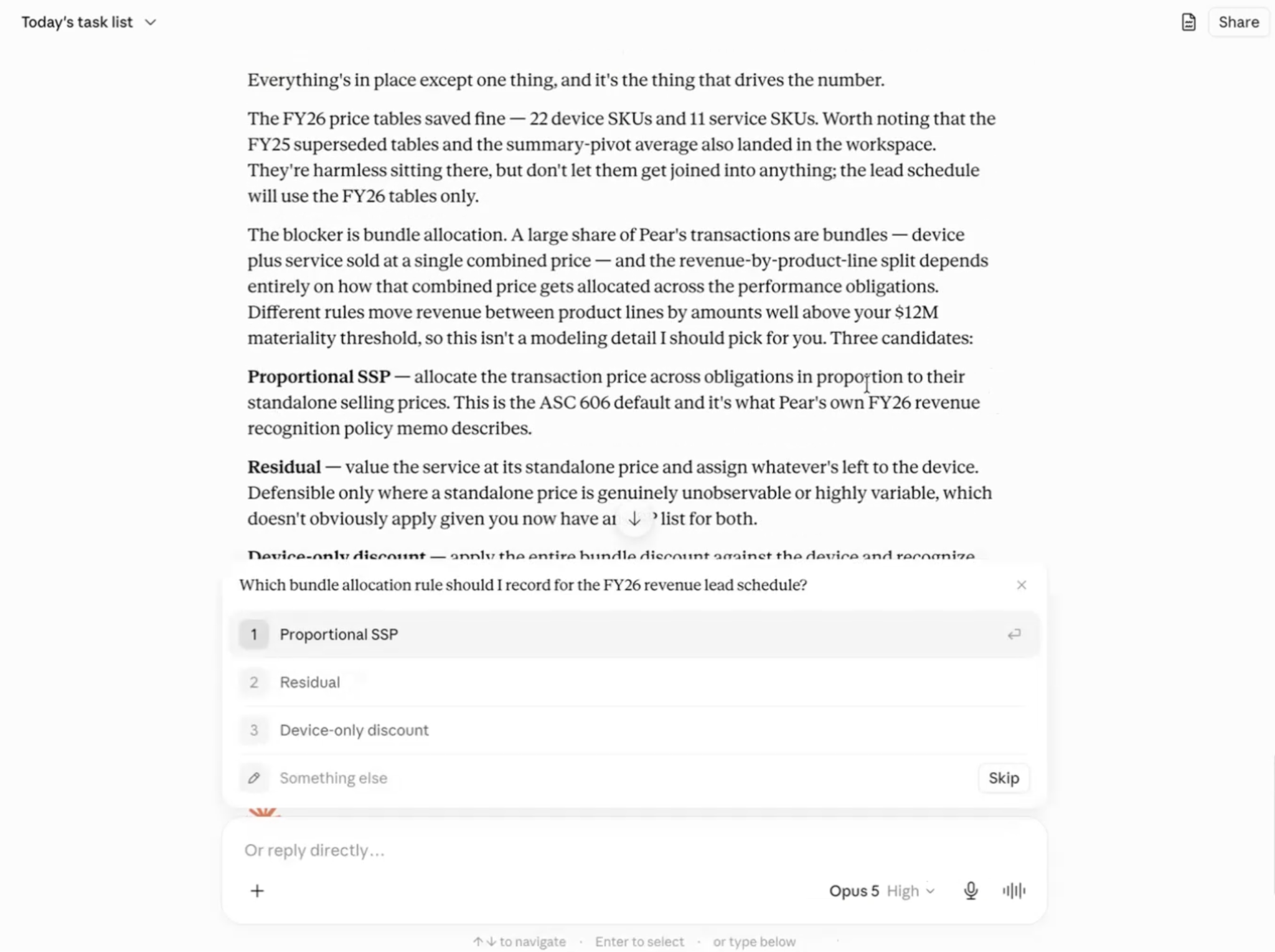
DataGPT files her SSP choice into the company's knowledge graph. Next month, she won't have to explain it again. Neither will a teammate running the same audit for another customer. Every approved workflow makes the next result better.
She approves the workflow and publishes it on a schedule. It runs as deterministic code on the organization’s data platform, Snowflake, with monitoring and a full history for the data team to review. Next month's audit runs itself.
Data prep was the first step. DataGPT carried the work from an open task to a scheduled, repeatable result, without leaving the conversation.
Try DataGPT free today
DataGPT is available now, free to start with no credit card required.
Bring Prophecy DataGPT into Claude, ChatGPT, or Microsoft Copilot, or use it directly in the Prophecy web app.
- For business analysts: Start with your preferred AI interface and turn business questions into visual workflows you can inspect, refine, and validate.
- For data, analytics, and IT leaders: Start with a pilot group and see how DataGPT turns business questions into repeatable workflows that can be put into production.
Point it at the data your team uses today, and review the first workflows to get a sense of how DataGPT operationalizes your data work.