Coders got AI that changed how they work. Business data analysts did not.
Business data users have watched software engineers go from drudgery to driving armies of AI minions; from writing code line-by-line to giving instructions, reviewing AI work, and shipping features like never before. The excitement is palpable, and the space has taken off with many new multi-billion-dollar revenue coding products.
Business data users got AI at the same moment, and nothing like that happened. The analysts in finance, audit, risk, operations, and pricing got limited solutions, like answering data questions: ask a question on the limited curated data and hope there were no hallucinations. There are millions of developers but even more Excel users. Nobody equipped the larger group.
Business data work is just as amenable to AI. Two things made a difference, and neither of them is about code.
The person stayed in the loop and could check the work. An engineer never had to take the agent's word for anything: what came back was laid out to be read, questioned, and corrected before it went anywhere.
What came back was a shared artifact that is automated. Not a one-off answer that disappears, but the same thing the team already reviewed and shipped from - handed to a colleague, picked up again next month, put into production without being rebuilt.
The shared knowledge is never captured. The shared knowledge for code lives in the codebase and design documents. Business analysts have a lot of tacit knowledge that is never captured, and AI has no access to it.
Nothing to check, and nothing to keep.
What is data work?
Ask an analyst where the week goes, and very little of it is in computing the final answer.
Before the analysis, the data is not ready. It sits in a system that will not export cleanly, in a vendor's PDF, in three spreadsheets that disagree, or under a chart of accounts that was remapped last year.
Data manipulation is messy. Combining three pieces of data that disagree, reconciling ERP systems against bank transactions, sales territory assignment, chasing someone to confirm what a field means. Working with real-world data is iterative.
After the analysis, the answer is not the end. It has to be packaged in the format the recipient demands (in reports, PDFs, regulatory formats, etc.) and defended when they come back wanting the same cut a different way on their deadline.
A company invests millions into the data platform, attaches AI chat to the warehouse MCP, and still ends up with tens of thousands of business data users who cannot get their work done, using desktop tools such as Alteryx and Excel spreadsheets.
Why is data work done best within ChatGPT, Claude, or Copilot?
Many of the enterprises we talk to have already put one of these AI assistants in front of every business user. Three reasons the data work belongs there:
- AI Apps are where the work begins. AI Apps are becoming the starting point, like the web browser to enterprise systems: the one place a banker gets everything the firm knows about a customer.
- The context is already there. This morning's questions, the project management systems they connected. Starting anywhere else means re-explaining all of it.
What is bringing AI to data work worth?
We believe the right AI tool that provides self-service and governance will deliver the equivalent of coding to the business. And data work often sits on the critical path of how the business earns.
Take auditing, for example. The major firms offer broadly equivalent services, so engagements compete on turnaround and price. Before an auditor looks at anything, someone has to take client books dumped out of operational systems and get them into the firm's standard format, and regulations require documenting the process. As the auditors dig into specific areas, deeper dives require additional iterative data work. Acceleration here means a more competitive offering.
Similarly, in structured finance, the sell side structures loans into tranches, and the buy side wants to bid on the most profitable ones. Accelerated data work means more deals structured, more deals considered, and better buying decisions.
So you start with productivity and deliver compelling business value.
How can you get this business value?
Prophecy is designed to work with your existing AI apps and your existing data stack. We are seeing finance, taxation, pharma, and operational teams move workloads from ad hoc spreadsheets and desktop data prep such as Alteryx to AI-native workflows running on governed data infrastructure.
Prophecy provides four important capabilities:
- Accelerate data work. Prophecy turns plain language requests inside ChatGPT, Claude, or Copilot into data work, reports, and analyses that run on your governed infrastructure.
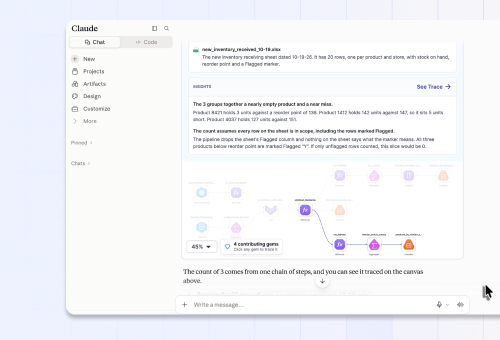
- Visually verify. All AI results come with a visual data workflow that the business analyst can verify step by step and make minor edits to, delivering trusted data assets.
- Compound knowledge. For agents to do more work independently with increasing accuracy, they must use existing knowledge, and daily work should add to it.
- Operationalize outcomes. The data work that is worth keeping is a shared and governed workflow, backed by code that runs natively on Snowflake, Databricks, or BigQuery.
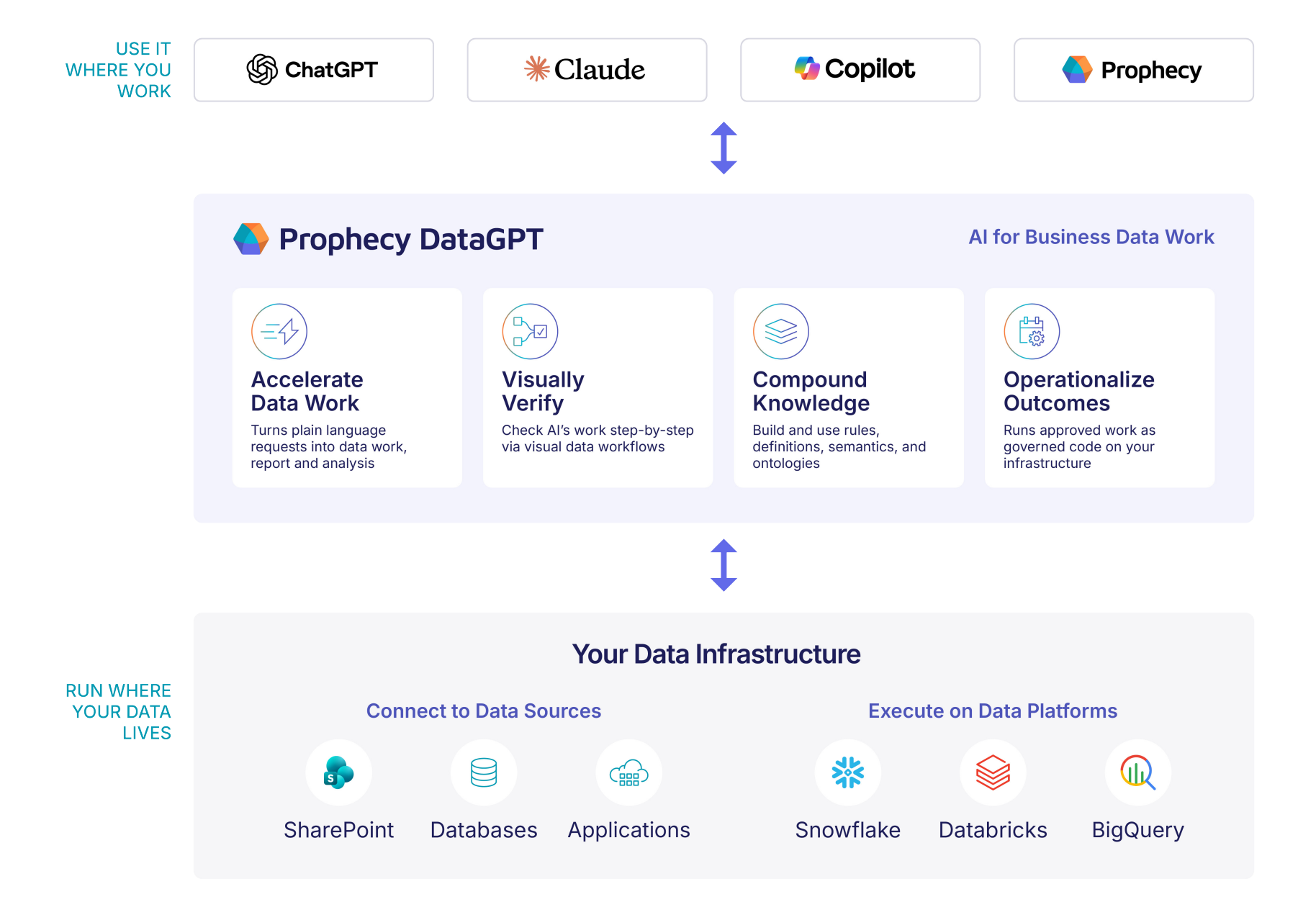
Prophecy has three major architectural components to support this:
- An AI data harness with specialized interfaces that embeds in AI apps and uses leading AI model APIs for delivering the data work.
- A knowledge system that is open and built primarily on ontologies, with AI memories.
- Data integration that includes connectors to common sources including SharePoint and shared files, databases, and applications. Prophecy also has a native execution experience on Snowflake, Databricks, and BigQuery.
We'll cover this in more detail in subsequent blogs.
How to Get Started
Prophecy DataGPT is available now for ChatGPT, Claude, Copilot, or in the Prophecy web app. You can sign up for a free account, or use your existing Starter or Professional edition login credentials. Take your messy spreadsheet process and start automating it to see the productivity gains at work.
For guidance on setup paths and building your first data workflow, refer to our community post.
Want to learn more about what’s included with Prophecy DataGPT? Check out our release blog here.