
Alteryx pricing starts at $250 per user per month, billed annually, for the Starter edition, and Professional and Enterprise are quote-only. Anyone who has opened an Alteryx renewal knows the seat price is only one line in the quote. Editions, user roles, and automation runs set the rest of the bill.
Here's what each Alteryx One edition includes, what buyers report paying, and what a team of three or five costs for a year.
Alteryx pricing: Quick summary
As of October 2026, Alteryx One offers three editions. Starter is the only one with public pricing at $250 per user per month, billed annually, or $3,000 per user per year.
Pricing information is based on Alteryx’s pricing page and is subject to change. Actual costs may vary depending on your plan, contract terms, and business requirements. Alteryx also offers a 30-day free trial of Alteryx One.
Three choices set your Alteryx One bill
Your Alteryx One bill depends on the edition, the user role, and the automation run capacity you buy.
Edition
The edition decides which products and capabilities your account gets. Starter covers basic prep in Designer Cloud, Professional adds desktop, cloud, and advanced prep, and Enterprise adds automation, governance, and Server access.
User role
Alteryx sells three roles. Full Creators get advanced analytics capabilities, Basic Creators get core tools, and Viewers run and consume shared assets without editing them. Viewers exist only in Enterprise, which includes free viewer licenses, so a 20-person rollout rarely means 20 identical seats.
Automation runs
An automation run is a workflow, plan, or app that executes through a schedule, an API call, or a viewer. Failed, validation, and design-time runs don't count, but viewer app runs do, so a widely shared app can use up capacity faster than the schedule suggests.
The pricing page doesn't state the period for included runs (50 on Professional, 15K on Enterprise), so ask for it in writing.
Alteryx editions explained
Alteryx One comes in three editions: Starter, Professional, and Enterprise. Each adds capabilities for more complex workflows, team collaboration, and governance. The right choice depends on who's building the workflows and how much control your organization needs.
Here's how they compare, with more detail on Alteryx’s pricing page.
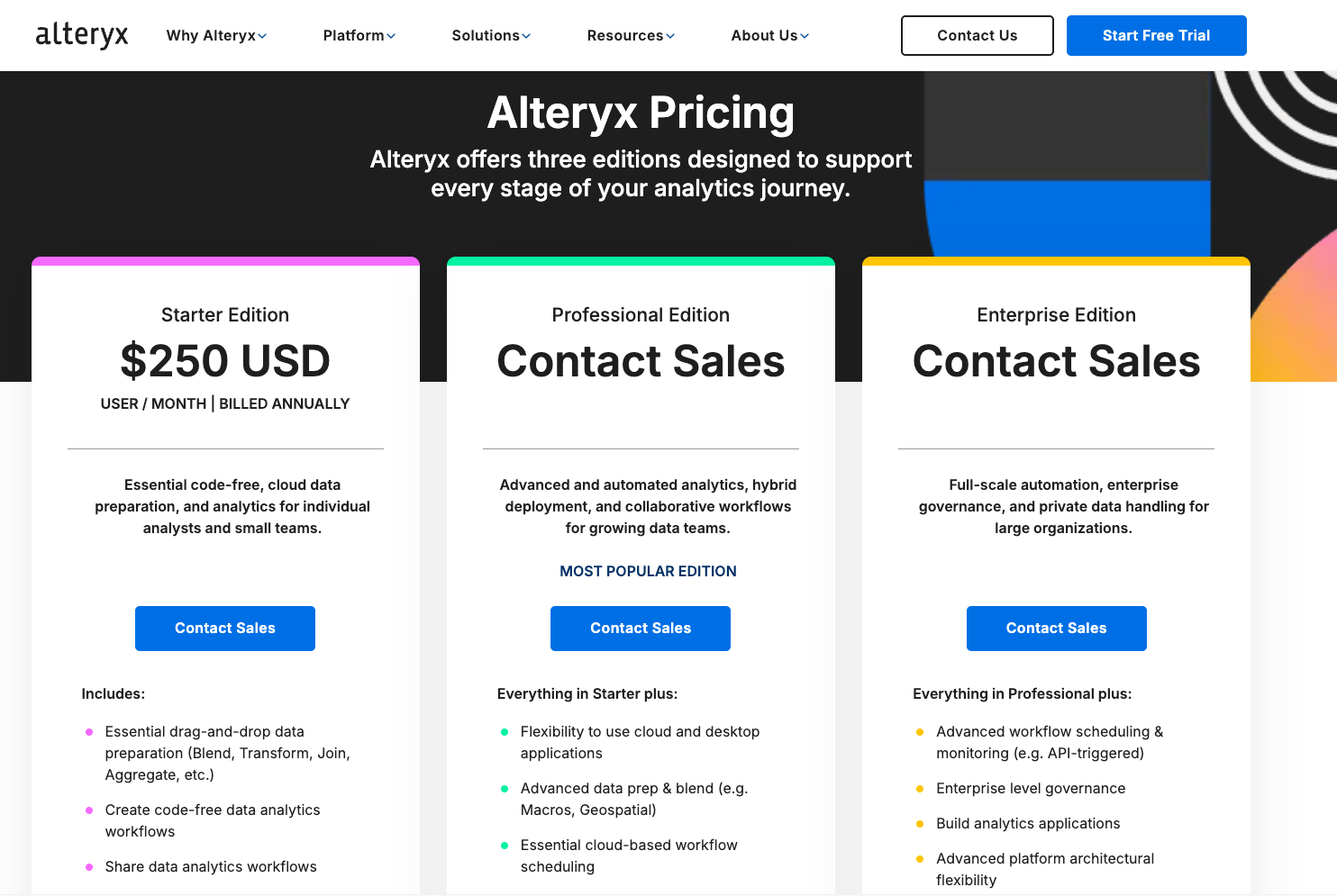
Starter Edition: $250 per user per month
Starter is the cloud-only entry point for individual analysts and small teams. It includes drag-and-drop prep (blend, transform, join, aggregate), code-free workflows, and sharing.
The catch is connectivity and automation: Starter connects to flat files only (.csv, .xlsx, and .json), allows one to ten seats, and lists no automation runs.
Professional Edition: Custom pricing
Professional adds desktop and cloud applications, advanced prep (macros and geospatial), 100+ data sources including Snowflake and Databricks, AI-powered assistance, and essential cloud scheduling. It fits growing teams that connect cloud data.
Included capacity is 50 runs, and Agent Studio and platform automation are each limited to one concurrent workflow.
Enterprise Edition: Custom pricing
Enterprise requires 10+ users and adds advanced scheduling and monitoring (API-triggered runs included), enterprise governance, analytic apps, private data handling, and Alteryx Server access.
It comes with 15K automation runs and free viewer licenses. Large organizations that run many scheduled workflows land here.
Where Designer, Server, and Cloud fit in Alteryx One
Designer Desktop, Designer Cloud, and Server now sit inside the Alteryx One editions, so each one no longer carries a standalone price. Alteryx describes the change as moving from separate Designer seats and Server cores to one platform choice.
The editions page applies to accounts launched in May 2025 or later, and earlier accounts keep their terms until they migrate. If your renewal date is close, it's worth working out what happens to your data workflows when your Alteryx license lapses.
Hidden and extra Alteryx costs
Depending on your setup, automation, add-ons, infrastructure, and renewals can all increase the final bill. Here are the extra Alteryx costs to keep an eye on:
- Extra automation runs: If your team needs more runs than its edition includes, you'll pay for additional capacity. Alteryx says Professional customers can buy extra runs in blocks of 1,000 at $1 per run. It doesn't publish an equivalent rate for Enterprise, so get that number in your quote.
- Data packages: Need location data or business insights? Location Insights and other data packages cost extra on Professional and Enterprise.
- Professional services: If you need Alteryx's help with implementation or other services, expect a separate charge.
- On-prem infrastructure: Running Alteryx Server on your own infrastructure means paying for hardware, storage, and IT support. Vendr highlights these costs.
- Renewal increases: Your first-year price may go up when it's time to renew. Ask about potential price increases and negotiate a cap before signing your contract.
- Training time: Alteryx offers Academy courses and certifications, but your analysts still need time to learn the platform. Factor that time into your budget, especially if your team is new to Alteryx.
What buyers report paying for Alteryx
Alteryx Starter starts at $3,000 per user per year. What companies actually sign for spreads far wider, because most contracts bundle multiple licenses into one number. Some organizations spend a few thousand dollars annually, while larger contracts can reach six figures.
Here's what Vendr reports from actual purchases, alongside the standalone product prices listed on TrustRadius:
Vendr labels that figure as an average contract value and notes most organizations buy a combination of Designer and Server licenses, so the $48,119 median reflects whole contracts rather than a single seat.
Add-ons sit on top: Vendr puts the Intelligence Suite and premium connectors at 20–40% of total contract value. Its figures also cover Designer, Designer Cloud, and Server licensing rather than the Alteryx One editions, which makes direct comparisons difficult.
There's room to negotiate, too. Vendr reports 15–30% discounts on multi-year contracts, while TrustRadius reviewers often cite high licensing costs but acknowledge the time saved.
For a realistic budget, request a quote covering your edition, users, automation needs, and add-ons.
Alteryx cost for a small team and a mid-size team
How much should you budget for three or five Alteryx users? At Starter list prices, three seats cost $9,000 per year, while five cost $15,000. Teams needing advanced tools or automation may face higher costs.
Here's how those figures compare with historical Alteryx product pricing.
Starter figures use current published list prices. Designer Cloud and Desktop figures are historical starting prices reported by TrustRadius.
The biggest cost difference comes from what your team needs to do. Starter covers basic flat-file workflows, while cloud data connections and scheduled automation require higher editions with quote-based pricing.
Before budgeting, check how many people need licenses, which data sources they'll use, and how often workflows must run. These requirements can change your total cost considerably.
Which Alteryx edition is right for your team?
The best Alteryx edition depends on where your data lives, who builds workflows, and how often those workflows need to run. A small team processing spreadsheets has different needs from one running daily pipelines across Snowflake and other cloud sources.
Here's how to decide without paying for capabilities your team won't use:
Choose Starter for basic data prep
Starter makes sense when your analysts mainly clean, join, and analyze spreadsheet data. It's the most affordable entry point, but its limits become apparent once workflows need to run automatically.
Starter is a good fit if …
- Your team has up to ten users working with CSV and Excel files.
- Analysts run workflows manually when they need results.
- You don't need scheduled jobs, cloud warehouse connections, or advanced analytics tools.
Choose Professional for growing analytics teams
Professional is worth considering when spreadsheets are no longer enough. It gives analysts more tools to build complex workflows and automate recurring work.
Professional is a good fit if …
- Your analysts need macros, geospatial analysis, or cloud data connections.
- Your team wants to build workflows across desktop and cloud environments.
- You have recurring reports or data preparation jobs that need scheduling.
Watch the automation allowance. If workflows run frequently throughout the day, ask how much additional capacity will cost before committing.
Choose Enterprise for larger, governed deployments
Enterprise fits organizations where Alteryx workflows support multiple teams and production processes. The main value is centralized control over who can build, run, and access workflows.
Enterprise is a good fit if …
- IT needs Server access, governance controls, and API-triggered workflows.
- Many employees consume workflow results without building workflows themselves.
- You run high volumes of automated jobs across departments.
Before upgrading, check whether your team will actually use the additional capacity and controls. Enterprise features only justify the cost when there's a clear operational need.
Alteryx alternatives and pricing
If Alteryx feels expensive for the work your team does, Prophecy and KNIME are worth comparing. Both offer free entry points, though they serve different needs.
Prophecy focuses on AI-powered data prep and analysis, while KNIME offers visual workflows for teams comfortable managing more of the setup.
Look beyond the license price. Compare the cost of running workflows, connecting data sources, and maintaining pipelines as your team grows. Prophecy's warehouse compute costs are separate, while KNIME's paid collaboration and automation capabilities can add to the budget.
Prophecy pricing compared with Alteryx
If your team needs more than Alteryx Starter's flat-file workflows, Prophecy is worth considering alongside Professional and Enterprise. Prophecy is an agentic data prep and analysis platform: its AI agents generate visual data workflows from plain-English prompts, which analysts then inspect, refine, and validate.
Unlike Alteryx's quote-based higher editions, Prophecy publishes pricing for three of its four plans:
- Starter: Free with 20 credits per month.
- Professional: $150/user/month, billed monthly, with 50 credits per user.
- Enterprise Express: $4,000/month, billed annually, for up to 20 users, including 100 Alteryx and Informatica workflow imports.
- Enterprise: Custom pricing for teams with 20+ users.
Your total cost also depends on where workflows run. Starter runs on Prophecy's embedded DuckDB engine, while paid plans process data in your existing Databricks, Snowflake, or BigQuery environment, with compute billed separately. Enterprise Express and Enterprise include unlimited workflow scheduling, while lower plans use credits.
One advantage worth considering is workflow portability. Prophecy generates SQL that can live in your Git repository, making the transformation logic easier to maintain outside the platform. Alteryx uses proprietary workflow files, though it offers a broader connector library.
If you're weighing a renewal against a move to warehouse-native data prep, our Alteryx vs. Prophecy comparison walks through the differences.
See what moving from Alteryx to Prophecy could cost
An Alteryx renewal is a good time to ask whether your team could get the same work done for less. Prophecy can import existing Alteryx workflows and automate much of the conversion, so your analysts can move to AI-powered data prep without rebuilding every workflow from scratch.
Explore how Alteryx migration with Prophecy works.
{{cta}}
Frequently asked questions
How much does Alteryx cost per user?
Alteryx Starter costs $250 per user per month, billed annually, or $3,000 per user per year. Professional and Enterprise require custom quotes based on your team's needs. Additional automation capacity, data packages, and services can increase the total cost.
Is Alteryx free or paid?
Alteryx is paid software, with Starter as its lowest-priced edition at $250 per user per month, billed annually. There's no permanently free edition, but Alteryx offers a 30-day free trial. You can use the trial to evaluate its data preparation tools before purchasing a license.
Is there a free alternative to Alteryx?
Yes, KNIME and Prophecy both offer free options for data preparation and analysis. KNIME provides an open-source desktop platform for building visual workflows, while Prophecy Starter includes 20 monthly credits for AI-assisted data prep.
Compare their connectors, automation limits, and deployment requirements before choosing.
Which company owns Alteryx?
Clearlake Capital and Insight Partners own Alteryx following its acquisition in 2024. The private equity firms took Alteryx private in a deal valued at approximately $4.4 billion, including debt. Alteryx continues to operate as a privately held data analytics software company.
What is Alteryx mainly used for?
Alteryx is mainly used for data preparation, blending, analysis, and workflow automation. Analysts use its visual tools to clean datasets, combine information from different sources, and build repeatable processes.
Common applications include financial reconciliation, automated reporting, and demand forecasting.