
An AI agent for data analysis can plan a series of steps, use a file or connected data source, run code or queries, and revise its approach when a step fails. A chatbot can answer a question, whereas an agent can also carry out parts of the work needed to investigate it.
When a revenue figure looks wrong, the final answer offers little help on its own. Your team needs to trace the source tables, examine the business rule, and rerun the calculation after making a correction.
This guide explains which agents can help with each part and where human review remains necessary.
Types of AI agents for data analysis: TL;DR
- General-purpose assistants: Run code on uploaded files for quick exploration, but source access and calculations may be opaque and hard to repeat
- BI and data platform agents: Answer questions on established metrics, but new definitions or sources still need review
- Purpose-built workflow agents: Build inspectable, reusable workflows for recurring analysis, but wrong joins, missed business rules, or incomplete data can still give convincing wrong results
What is an AI agent for data analysis?
An AI agent for data analysis carries out parts of an investigation using the data and tools available to it. For a revenue question, it could find the relevant tables, write a query, inspect the result, and correct an error before returning an answer.
The useful test is what happens after the answer appears. Can an analyst trace the number to its source, check the business rules, and update the work when those rules change? The answers reveal how well the agent fits a recurring analysis.
3 types of AI agents for data analysis: Quick comparison
AI agents for data analysis differ in their data access and output. Three groups cover the main approaches, although product features can overlap.
1. General-purpose assistants that run code
ChatGPT's data analysis features and Claude’s code execution and file creation can analyze uploaded spreadsheets and CSV files, execute code, and produce charts. If a business analyst needs to inspect missing values in a campaign export or compare two versions of a file, the conversation offers a quick starting point.
ChatGPT can also use available connected sources, subject to the connected account's permissions.
The review process depends on the organization's setup and the task. Before using an assistant with production data, check which sources it can reach, whether its calculations are visible, and how you would repeat the analysis next month.
Governance for AI coding agents covers the access and review questions that arise as these tools move beyond file-based exploration.
2. Agents within BI and data platforms
Power BI Copilot, Tableau Agent in Pulse, ThoughtSpot Spotter, Databricks Genie, and Snowflake Cortex Analyst help people question data within an existing analytics environment.
The available data and definitions vary by product. Tableau Agent in Pulse, for example, works with insights from defined Pulse metrics.
These tools fit questions such as, “How did weekly revenue change by region?” when the underlying data and metric already exist.
A new definition of revenue or an added source still needs preparation and review. The agent's answer inherits the strengths and limits of the model or data context behind it.
3. Purpose-built agents for governed workflows
A recurring question often needs a repeatable process. Purpose-built agents can help prepare the inputs and build a workflow whose steps remain available for inspection, revision, and future runs.
Their controls and generated outputs differ, so the workflow itself deserves as much scrutiny as the final chart.
Prophecy is an AI data prep and analysis platform in this group. A business analyst describes the goal in plain language, then reviews the generated visual steps, checks intermediate outputs, and refines the business rules.
Because the visual workflow and the underlying code stay in sync, analysts build and check the logic visually while engineers read and edit the same SQL. That makes Prophecy more flexible than desktop tools that keep work in proprietary files.
The workflow can be deployed as warehouse-native SQL through a dbt project (the open, standard SQL format data engineers already use), with code stored in Git and processing on Databricks, Snowflake, or BigQuery.
AI agents in data preparation explain how the workflow moves from an initial request to validated output.
How AI agents work through an analysis
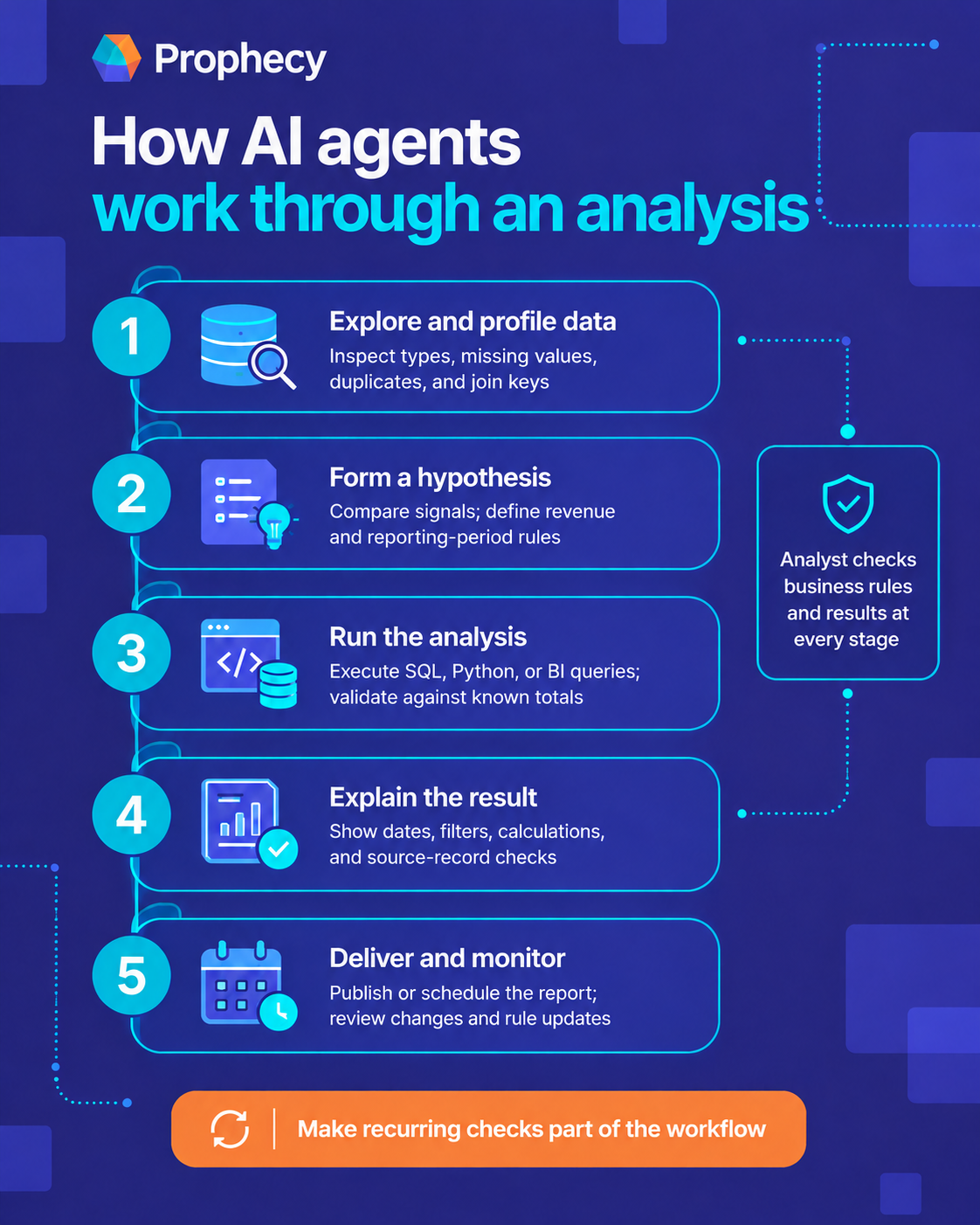
AI agents work through an analysis by inspecting the data, testing possible explanations, running queries or code, and presenting the findings. Some can also deliver and monitor a recurring report, while an analyst checks the business rules and results at each stage.
1. Explore and profile the data
Before calculating revenue, an agent can inspect column types, missing values, duplicate orders, and potential join keys. If one customer record matches several order rows, a careless join may inflate the total even though the query runs without error.
An analyst can catch that problem by checking row counts before and after the join. For recurring reports, the check should become part of the workflow itself.
2. Form a hypothesis
Suppose revenue fell while order volume stayed steady. The agent might compare prices, refunds, and customer segments to identify possible explanations. An analyst still needs to define which transactions count as revenue and whether late adjustments belong in the period.
The agent's proposed cause remains a hypothesis until the team tests it against the right data and business rules.
3. Run the analysis
The agent executes SQL, Python, or a query against a BI model. It may inspect an error and revise its code when a column name has changed. A successful run then needs checks against known totals and sample records, especially if the query joins several tables.
4. Explain the result
A chart or paragraph makes a finding easier to share, but the explanation needs the dates, filters, and calculations behind it. If the result says refunds caused the revenue decline, the analyst should be able to inspect the refund calculation and compare it with the source records.
5. Deliver and monitor
An analysis may end in a conversation, feed a dashboard, or run on a schedule. Recurring work needs an owner who checks changes in the result and responds when a source or business rule changes.
Agentic data prep implementation addresses the people and processes involved in turning that work into an ongoing workflow.
Examples of AI agents for data analysis at work
The strongest use cases begin with a question a business analyst owns and a result someone else will rely on.
- A weekly finance report needs an explanation for a revenue change. The agent compares orders, refunds, and late adjustments, then leaves the calculation open for the analyst to check.
- A campaign review needs a reliable acquisition cost. The agent brings spend and order data together, and the analyst verifies the attribution period before the team acts on the finding.
- A supplier review starts with files that vary from week to week. The agent profiles each upload and flags records that break the expected format.
For a recurring task, assess how the work survives the next file, rule change, or question from leadership.
Where AI analysis agents can go wrong
A chart can look ready for a leadership meeting even when the analysis behind it needs work.
These are the failure points to check before an agent’s answer becomes a report or a recurring workflow:
- Wrong number, convincing chart: A join counts the same order twice, or a date filter drops the final day of the month. Compare the total with a trusted report and inspect the query.
- Weak evidence for a trend: Sales rose after a campaign launched, but the agent checked only one week. Review the sample size, earlier periods, and other changes that could explain the increase.
- A business rule the agent missed: Finance excludes late adjustments from the weekly report. If that rule lives only in someone’s head, the agent may produce a different revenue figure. Have the business analyst confirm the definition.
- Incomplete data: An analysis of customer behavior uses online purchases while leaving out store sales. Check which groups and channels the source data covers before acting on the finding.
- No record of the work: Three months later, someone questions the number, and the team cannot find the source, query, or approved version. AI agent workflow governance covers how to retain those details through review and deployment.
For recurring analysis, make the checks part of the workflow. The business analyst should approve the business rules and the result, while the platform team can review what the agent accessed and what runs in production.
Which AI agent is best for data analysis?
The best AI agent for data analysis depends on the work your team repeats. A general-purpose assistant suits a file-based investigation, while an agent in a BI platform can answer questions about metrics already defined there.
For recurring data preparation and analysis, test whether the tool leaves an inspectable workflow that a business analyst can update under the platform team's controls.
Start with one question your team answers each month. Ask each candidate to find the inputs, apply a known business rule, explain the result, and handle a routine rule change.
Prophecy's comparison of AI tools for business analytics provides a broader product shortlist once those requirements are clear.
Help business analysts turn questions into work the team can trust
A business analyst may know why a revenue figure needs a different cutoff, yet still wait for engineering to update the pipeline. Giving the analyst an AI-generated answer helps with that immediate request. The team also needs a way to check the logic and use it again.
Prophecy turns a plain-language request into a visual workflow the analyst can inspect, refine, and validate step by step. Once approved, the workflow becomes SQL in a dbt project that the platform team can review in Git and run on Databricks, Snowflake, or BigQuery.
Request a demo with a recurring analysis your team already knows. Bring its source data, business rules, and expected result to see how the analyst verifies the work before it reaches production.
Frequently asked questions
Can AI agents do data analysis?
Yes, AI agents for data analysis can inspect data, run queries or code, and explain results when they have access to the right tools. An analyst should still check the source data, business definitions, and calculations before using the findings.
How do AI agents differ from traditional BI tools?
Traditional BI tools present reports and metrics that a team has prepared. AI agents can take a question, plan analytical steps, use tools to investigate it, and revise their approach when a step fails. Many BI platforms now include agent features, so the capabilities overlap.
What are examples of AI agents for data analysis?
Examples of AI agents for data analysis include assistants that run code on uploaded files, agents that answer questions about BI metrics, and agents that build reusable data workflows. ChatGPT’s data analysis features, Databricks Genie, and Prophecy illustrate these different roles.
How can you check an AI data analysis agent’s answer?
Check the source records, date range, filters, joins, and business rules behind the answer. Compare the result with a known total, then review the query or workflow for steps that changed the data.
Will AI agents replace data analysts?
AI agents can take on parts of an analyst’s work, including profiling data, writing queries, and preparing reports. Data analysts remain responsible for framing the question, checking the method, and deciding what the result means for the business.