


TL;DR
Here are the key takeaways from this guide:
- Migration stalls are people problems: Most Alteryx-to-Databricks migrations stall because analysts lose their visual tooling, and nobody plans for the productivity gap.
- Parallel operations compound costs: Running both systems in parallel compounds costs across maintenance, security, talent, and time-to-market.
- Ungoverned workarounds erode quality: Without visual tools, analysts resort to ungoverned workarounds in Excel and comma-separated value (CSV) files that erode data quality.
- Prophecy bridges the gap: Prophecy's AI-accelerated data prep platform lets analysts keep prepping and analyzing data visually, with AI agents that handle the heavy lifting, while running natively on your Databricks infrastructure, not ours.
- Proven migration results: Organizations like HealthVerity have migrated hundreds of workflows in weeks, not quarters, while preserving governance and analyst productivity.
Your team knows Alteryx Desktop inside and out, the drag-and-drop workflows, the visual logic, and the ability to build and iterate without filing an engineering ticket. But as organizations consolidate onto Databricks, that familiar environment is on the chopping block. And with it, the productivity your analysts depend on every day.
Most migrations stall not because the technology is wrong, but because analysts lose the visual tooling they've mastered, and nobody has a plan to keep them productive while the platform catches up. The result is months of lost velocity, shadow workarounds, and business logic that quietly disappears in translation.
Prophecy's position is straightforward: you shouldn't have to choose between modernizing your data platform and keeping your analysts effective. With AI-accelerated data prep that runs natively on Databricks, analysts can keep prepping and working with data visually, without waiting on engineering or rebuilding everything from scratch. Your platform team stays in control of compute, governance, and security. Prophecy runs on your stack, not ours.
Most migrations fail, and the reasons aren't technical
Data platform migrations fail for a familiar set of reasons: timelines slip, costs climb, and the business side loses confidence. The biggest drivers are usually people and process problems, not architecture decisions.
A common pattern shows up in Alteryx-to-Databricks moves:
- Analysts lose their self-service capability: Business analysts who've built visual workflows for years are suddenly told to wait for engineering to rebuild everything in the new environment. Their productivity drops immediately, and engineering gets pulled into ad hoc data workflow requests that consume 10–30% of their capacity, the equivalent of one to three full salaries on a team of 10 engineers.
- Business context gets lost: The logic baked into every filter, join, and aggregation reflects decisions analysts have refined over time. When someone else recreates those data workflows without that context, the results are often incomplete or wrong.
The result is predictable. Analysts wait; business logic gets lost in translation; and the organization's ability to act on data slows to a crawl. Meanwhile, the business is stuck with stale, slow, or untrusted data.
The dual-pipeline trap nobody budgets for
Most organizations don't flip a switch. They run both systems in parallel for a while. In practice, this often creates more problems than it solves:
- Data sync overhead: Ongoing data synchronization between environments introduces latency, complexity, and risk of inconsistency.
- Dual-platform competency: Staff must be competent on both platforms, splitting focus and slowing work on each.
- Reporting conflicts: Reporting gets consolidated from two different data models, making it harder to trust any single source of truth.
- Compounding debt: Instead of resolving technical debt, parallel operations compound it; every week adds more to unwind later.
Five cost categories accumulate during parallel operations:
- Direct and indirect maintenance costs: Licensing, infrastructure, and untracked time moving data between systems create ongoing financial drag that's rarely captured in migration budgets.
- Time-to-market delays: Dual environments slow every delivery cycle. Teams spend more time coordinating between platforms than shipping results.
- Operational and security risk: Two systems mean two attack surfaces and two failure points. Incident response, monitoring, and compliance efforts double.
- Innovation barriers: Teams can't build what's next while maintaining both systems. Capacity goes to keeping the lights on rather than driving new value.
- Talent risk: It's harder to hire and retain staff who are competent in both environments. The labor market for niche legacy tools continues to shrink every year.
For analytics leaders, this translates to a team stuck between two worlds, neither of which is productive. And with Alteryx migrating customers to Alteryx One, a cloud SaaS product that's less capable than their desktop tools and significantly more expensive, the pressure to find a better path is only increasing.
What analysts actually lose (and what it costs)
When an analyst loses access to a visual tool they've mastered, they don't just lose a product. They lose velocity.
Removing visual tooling during migration can force teams to backfill capacity just to maintain current output. As one analytics leader put it: "If I didn't have a visual analytics tool, I would need two to three more data analysts to fill that gap."
The analysts who stay don't sit idle; they find workarounds because their work is important and other business stakeholders are waiting on it. So, they pursue:
- Spreadsheet logic: Analysts start building transformation logic in Excel, creating fragile, undocumented processes that are nearly impossible to audit or scale.
- File-based data sharing: Teams begin emailing CSV files back and forth, bypassing any governance or version control.
- Shadow data workflows: Analysts stitch together ungoverned data workflows that nobody monitors, creating hidden dependencies and data quality risks.
Data quality erodes not because people stop working, but because they keep working with whatever's available. These ungoverned workarounds become the real migration tax: invisible, compounding, and expensive to unwind.
When self-service capabilities get disrupted, business users revert to submitting requests and waiting days for reports. By the time the dashboard arrives, the opportunity has often passed. The business wants fast, trusted, accurate data, and analysts want to deliver it without waiting on engineering.
The migration path that preserves analyst productivity
Once data engineers have built the core ETL pipelines on Databricks, analysts still need a way to prep, shape, and work with that data, without filing a ticket for every request.
Prophecy's AI-accelerated data prep platform fills that gap. Analysts stay in a visual, drag-and-drop environment to prep data for analysis, while Prophecy runs natively on Databricks underneath. No desktop installs, no separate systems, just a familiar visual experience on top of your enterprise-grade infrastructure. Unlike legacy tools, where you're locked into their governance model, Prophecy runs on your cloud data platform. Your platform team stays in control, compute, governance, and security all live in your stack, not ours.
And this isn't about blowing everything up in one cycle. The efficiency use case is where teams start, show your analysts a faster, better way to build and manage data workflows alongside what you already have. When the value is clear, the migration follows naturally.
Automated workflow conversion in minutes, not months
Prophecy's Migration Copilot turns weeks-long conversion efforts into a much faster, repeatable process. The transpiler makes migration from tools like Alteryx straightforward. Here's what the conversion delivers:
- Standard, open formats: Visual data workflows (sometimes also referred to as data pipelines) convert to standard, open formats with no proprietary lock-in and no black-box code.
- Preserved visual logic: Analysts see their logic preserved in a visual interface they recognize, allowing them to validate immediately without learning a new paradigm.
- Immediate productivity: Instead of waiting for someone to rebuild your workflows from scratch, you can pick up where you left off, prepping and analyzing data in a familiar visual environment.
Analysts validate their own migrated data workflows without relying on engineering to translate intent. Every workflow migrated is one more proof point for the platform your engineering team has built.
Visual data workflows that analysts already know how to build
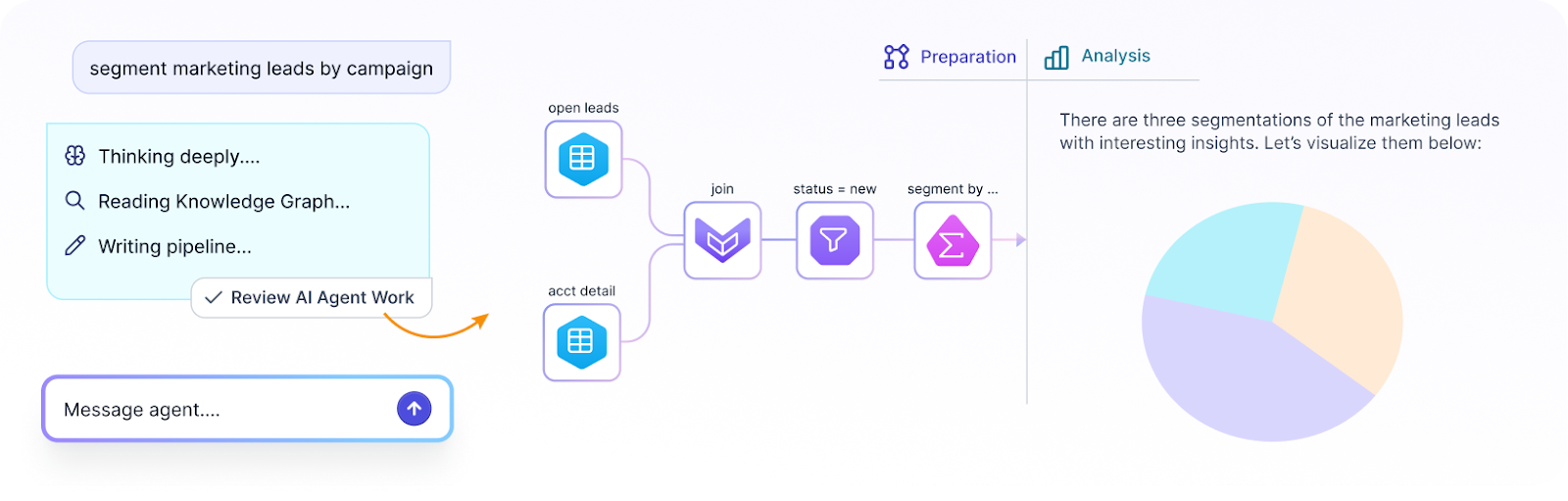
Prophecy's interface uses visual building blocks called Gems, categorized transformations for joins, filters, aggregations, and custom logic that work the way Alteryx users already think.
Analysts use drag-and-drop to build visual data workflows for data preparation. Once data engineers have built the core ETL pipelines, analysts use Prophecy to prep, shape, and refine that data for analysis, all within a governed environment that runs natively on Databricks.
All execution happens on Databricks clusters. No data moves to a desktop; no separate compute layer to manage.
[Screenshot: Prophecy's visual workflow interface showing drag-and-drop Gems for data preparation]
Governance that keeps platform teams in control
For analytics leaders, governance is often the biggest barrier to getting analyst self-service approved. Platform teams need to know that giving analysts direct access won't create risk. Prophecy addresses this through several layers:
- Unity Catalog integration: Guardrails stay in place, and agents are limited by user permissions. No one can access data or resources beyond what their role allows.
- Git-backed version control: Every data workflow gets full governance, collaboration, and review trails. Nothing goes to production without oversight.
- Platform team control: Your platform team stays in control, compute, governance, and security all live in your stack, not Prophecy's. Analysts get self-service; governance stays intact.
No shadow data workflows. No ungoverned workarounds. One system.
AI agents that help analysts prep data without engineering skills
This is where Prophecy changes the game for analysts. Prophecy's agentic data prep model supports a Generate, Refine, Deploy workflow that puts data preparation in analysts' hands:
- Generate: Describe what you need in plain language, and AI agents generate a first draft of a visual data workflow, giving you a starting point rather than a blank canvas.
- Refine: Inspect, validate, and adjust the output using your domain expertise. You know the data and the business context better than anyone, and this step is where that knowledge gets applied.
- Deploy: Once validated, data workflows deploy through governed processes, ensuring everything meets production standards before it goes live.
The refinement step is where domain expertise lives, and why AI agents work best as accelerators for analysts, not replacements. Think of it this way: handing five people a mixed pile of train set parts with no instructions and asking them each to build a track means they won't match. That's ungoverned AI-generated code. Prophecy uses AI acceleration plus human review, standardization, and Git retention, so you get the speed of AI with the reliability of engineering.
How this fits with your engineering team
Prophecy doesn't replace your data engineering team; it complements them. Data engineers build and maintain the core ETL pipelines that feed clean, structured data into Databricks. Analysts then use Prophecy to prep and shape that data for their specific analysis needs, without requiring engineering support for every request.
This means engineers can stay focused on infrastructure, optimization, and pipeline reliability, while analysts get the self-service data preparation capabilities they need to move fast. Both teams work within the same governed environment, so there's no disconnect between what engineers build and what analysts consume. The analyst becomes the hero; the business gets what it's been asking for; and engineering stops being the bottleneck.
When platform and engineering teams talk about modernization, they want to show momentum, workflows migrated, data workflows modernized, adoption numbers climbing. Prophecy becomes part of that story. The transpiler accelerates migration so they can point to real progress quickly, and every data workflow built in Prophecy is one more proof point for the platform they've built.
What this looks like in practice
The outcomes aren't theoretical. Here are three examples of organizations that've migrated with Prophecy:
- Global biopharmaceutical company: Migrated 200+ workflows, achieved 2× faster key performance indicator (KPI) refresh cycles, and retired legacy infrastructure.
- Fortune 50 healthcare services company: Runs ~500 production jobs with Unity Catalog, enabling data teams without requiring hardcore engineering skills.
- HealthVerity: Reported 66% cost reductions and 80%+ time savings after standardizing governed data workflow development.
You can see a consistent pattern. The migration timelines are measured in weeks rather than quarters, analyst productivity is preserved from day one, and governance is maintained without becoming a bottleneck.
Preserve analyst productivity during your Databricks migration with Prophecy
Moving from Alteryx Desktop to Databricks shouldn't mean choosing between platform modernization and analyst productivity. Too many teams lose months to stalled migrations, ungoverned workarounds, and business logic that disappears in translation, all because there's no plan to keep analysts working while the platform catches up. Prophecy, an AI-accelerated data prep and analysis platform, bridges that gap by letting analysts keep prepping and analyzing data visually, with AI agents that handle the heavy lifting, all running natively on your Databricks infrastructure, not ours. Key capabilities include:
- AI agents: Describe what you need in plain language, and AI agents generate a first draft of a visual data workflow. Analysts refine and validate using their domain expertise; no engineering skills are required.
- Visual interface with real code underneath: Drag-and-drop Gems let analysts build and iterate the way they're used to, while the platform generates governed, production-ready code underneath. Both analysts and platform teams can trust the output.
- Data workflow automation: Migration Copilot automates the conversion of Alteryx workflows into standard, open formats, and Git-backed governance ensures every data workflow is reviewed and tested before reaching production.
- Cloud-native deployment: Run natively on Databricks, BigQuery, and Snowflake with no separate compute layer or desktop dependency. Your platform team stays in control, compute, governance, and security all live in your stack.
Analytics leaders are identifying the productivity gap and looking for a better path. Data platform leaders want efficiency, data quality, and something their engineering team can trust and govern. Prophecy speaks to both: agentic, AI-accelerated data prep that makes analysts self-sufficient and gives platform teams full visibility and control.
With Prophecy, your team can migrate from Alteryx to Databricks in weeks, not quarters, while keeping analysts productive and governance intact from day one. Request a Prophecy demo and bring a workflow, watch it convert in real time.
Frequently asked questions
Can Prophecy automatically convert my existing Alteryx workflows?
Yes. Prophecy's transpiler and Migration Copilot automate the conversion of Alteryx visual workflows into production-ready code. The process preserves your business logic in a visual interface, so analysts can validate and start working with their data immediately on Databricks.
Do analysts need to learn SQL to use Prophecy?
No. Analysts build visual data workflows using drag-and-drop Gems, no coding required. AI agents can also generate data workflows from plain-language descriptions, keeping analysts productive without requiring them to learn a new programming language.
How does Prophecy handle governance and access control?
Unlike legacy tools, where you're locked into their governance model, Prophecy runs on your cloud data platform. It integrates with Unity Catalog and uses Git-backed version control for every data workflow. Your platform team keeps its existing access controls, and all data workflows go through governed review processes before reaching production. Compute, governance, and security all stay in your stack.
Does Prophecy only work with Databricks?
No. While this guide focuses on Databricks migrations, Prophecy also deploys natively on Snowflake and BigQuery. Teams can run governed, production-ready data workflows across multiple cloud platforms without vendor lock-in.
Ready to see Prophecy in action?
Request a demo and we’ll walk you through how Prophecy’s AI-powered visual data pipelines and high-quality open source code empowers everyone to speed data transformation



