

Dataiku brings data preparation, analytics, machine learning, AI agents, deployment, and governance into one platform. The best Dataiku alternatives divide those jobs differently.
Alteryx centers recurring analyst workflows. Databricks, DataRobot, and the cloud platforms cover larger data and AI programs.
We reviewed current product documentation and pricing from each vendor. This guide compares 11 Dataiku competitors by team fit, deployment, governance, coding options, and cost.
Best Dataiku competitors and alternatives in 2026: TL;DR
- Prophecy: Best for governed analyst self-service with AI on your cloud warehouse
- Alteryx: Best for analyst-led data preparation, reporting, and automation
- Databricks: Best for data engineering and AI on a shared lakehouse
- DataRobot: Best for operating and governing models and AI agents
- KNIME: Best for visual data science with a free local starting point
- Altair AI Studio: Best for visual predictive modeling across mixed-skill teams
- H2O.ai: Best for open-source AutoML with enterprise AI options
- Amazon SageMaker: Best for AWS teams building custom data and ML workflows
- Azure Machine Learning: Best for Azure teams managing the machine learning lifecycle
- Tableau Prep: Best for Tableau teams preparing data for dashboards
- Microsoft Fabric and Power BI: Best for Microsoft-based data, analytics, and reporting teams
How we researched these Dataiku alternatives
We researched these Dataiku alternatives through each vendor's official product pages, documentation, and pricing pages. A uniform hands-on benchmark was outside this research process, which means the rankings reflect product fit and published capabilities.
The review used five practical checks:
- User fit: Who builds the workflow, and how much code do they need?
- Workload fit: Does the platform center data prep, BI, machine learning, AI agents, or several of those jobs?
- Deployment fit: Where does the work run, and how tightly does the product bind a team to one cloud?
- Governance: Can administrators track data, code, models, permissions, and production changes?
- Cost: What does the vendor publish, and which charges remain variable or quote-based?
The order favors direct overlap with Dataiku. Specialized BI and preparation tools appear later because they replace a smaller part of the platform.
Why consider Dataiku alternatives?
Teams consider Dataiku alternatives when another product matches their users, cloud, or workload more closely. Dataiku covers a broad AI lifecycle. A narrower tool can reduce purchasing and setup work when your team needs one part of that lifecycle.
- Your primary users matter. Business analysts may prefer a visual workflow product built around recurring reports and data preparation. Data scientists may care more about experiments, registries, endpoints, and model monitoring.
- Your cloud can narrow the shortlist. Databricks, AWS, Azure, and Microsoft Fabric each offer native development and governance inside their own environments. A multi-platform team may give portability and external Git ownership more weight.
- Pricing models behave differently. Dataiku keeps paid prices private. Competitors range from free desktop software to per-user plans, cloud consumption, and custom enterprise contracts.
Dataiku still belongs on the shortlist when one workspace needs to serve analysts, data scientists, AI teams, and governance owners. Its 14-day cloud trial and self-hosted Free Edition give teams two ways to test the platform before requesting a paid quote.
11 best Dataiku competitors and alternatives at a glance
1. Prophecy: Best for governed analyst self-service
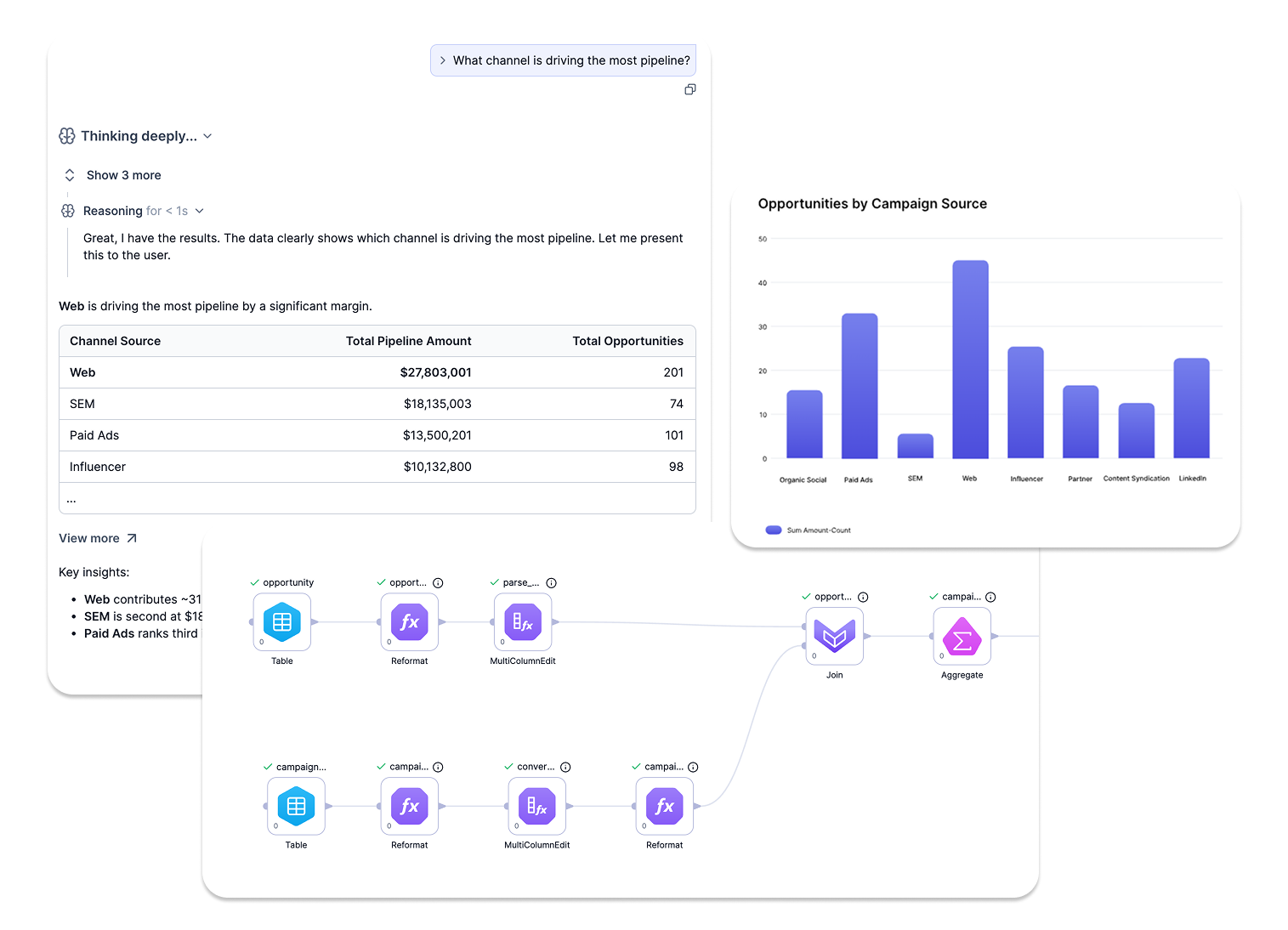
What it does: Prophecy is an AI data prep and analysis platform. Analysts describe a goal in plain English, and AI agents build a visual workflow that compiles to SQL and runs on Databricks, Snowflake, or BigQuery.
Best for: Business analysts and data platform teams that want analysts to build data preparation and analysis workflows visually, while engineers review the generated code and control promotion to production.
Pricing: Prophecy has a free Starter plan. Professional costs $150/user/month, billed monthly, with 50 credits per user. Enterprise Express costs $4,000/month for up to 20 users, billed annually. Enterprise is custom. On the tiers that process data in your warehouse, your own cloud platform bills the compute.
Prophecy overlaps with Dataiku on data preparation and analysis but leaves model development to other tools. An analyst types a request such as "join invoices to the vendor master and flag duplicate payments," and the Transform agent builds the steps as gems on a visual canvas. The agents are built on a specialized, guardrailed version of Claude Code that unit-tests each step before it appears on the canvas. The analyst opens a gem, runs it, and profiles the output.
Each gem maps to SQL that Prophecy saves in Git inside a dbt project, so engineers can review it like any other code. SQL transformations run on your cloud data platform, while Prophecy Automate (the Prophecy-native runtime included in all editions) handles data ingestion, output, and scheduling, and never stores your data. The Documentation agent drafts pipeline documentation.
Where Prophecy works well
- Visible logic: Analysts can run and profile each gem before deployment. They can also preview the data before and after each logical step.
- Visual plus open code: Analysts build and check the workflow visually, while engineers open the same logic as SQL in your own Git. It’s readable and portable. Plus, it runs on Databricks, Snowflake, or BigQuery, so nothing is tied to one cloud vendor or locked in a proprietary file.
- Migration import: Prophecy’s import feature converts Alteryx and Informatica workflows, and analysts review the output and any gaps.
Where Prophecy falls short
Prophecy does not cover model development or MLOps, and its dashboards do not replace a BI tool. Connector coverage follows customer demand, so confirm your sources, including on-premises systems.
Workday and shared network drives are current gaps that need networking work or a private-link deployment, while Python extensibility covers the rest.
Warehouse-native processing begins on Professional, since Starter runs on embedded DuckDB compute. Credits cover AI requests, seats, compute, and storage, with pay-as-you-go beyond the monthly allowance. Prophecy runs on Anthropic models, so check your AI vendor approvals, although enterprises can supply their own endpoint through Amazon Bedrock.
Bottom line
Prophecy fits when an analyst request backlog is the pain and the data already sits in Databricks, Snowflake, or BigQuery. Skip it if the purchase centers on model development and MLOps. The Alteryx versus Prophecy guide compares the analyst-focused options.
2. Alteryx: Best for analyst-led analytics automation
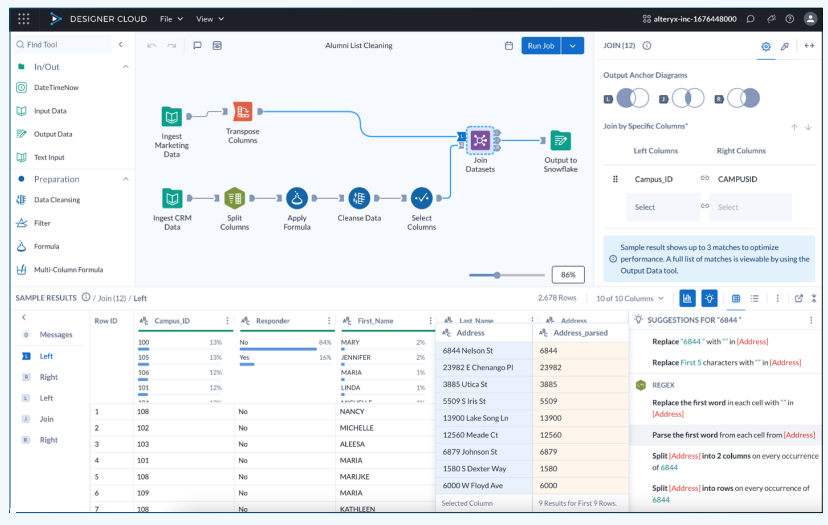
What it does: Alteryx One turns source data and business rules into visual workflows for preparation, reporting, analysis, and operational automation.
Best for: Finance, operations, and analytics teams that want business analysts to own repeatable workflows.
Pricing: Alteryx Starter costs $250/user/month, billed annually, for one to 10 Basic users. Professional and Enterprise require quotes, with pricing shaped by edition, user roles, and automation runs.
Alteryx comes closest to Dataiku when the daily work centers on visual data preparation and business analytics. An analyst can turn a monthly close workbook, CRM export, or reconciliation process into a reusable flow without building a Python application.
Current Alteryx packaging reaches beyond the old desktop-only comparison. Starter runs in the cloud. Professional adds desktop applications, cloud scheduling, AI assistance, hybrid deployment, and connections to more than 100 data sources.
Where Alteryx works well
- Visual preparation: Drag-and-drop tools cover joins, transformations, aggregation, macros, and geospatial work
- Recurring operations: Scheduling and automation turn manual reporting tasks into repeatable processes
- Flexible authoring: Professional supports cloud and desktop applications for teams with mixed requirements
Where Alteryx falls short
Starter connects to flat files and stays cloud-only. Database connections, desktop access, broader automation, and enterprise governance require Professional or Enterprise, and those tiers are quote-based.
Workflows are saved in Alteryx's own formats, so moving them to another platform takes a migration project. Teams still on older desktop deployments may also face a move to Alteryx One. Dataiku offers a wider home for ML experiments, model operations, and AI agents.
Bottom line
Alteryx belongs near the top of the shortlist when finance or operations analysts own a recurring process that still moves through spreadsheets and exports. Model registries and agent governance move the decision toward Dataiku, as the self-service analytics buyer's guide explains.
3. Databricks: Best for one data and AI environment
What it does: Databricks combines data engineering, warehousing, machine learning, AI development, and Unity Catalog governance.
Best for: Data teams already committed to Databricks that want preparation, engineering, models, and governance in the same environment.
Pricing: Databricks uses pay-as-you-go pricing. Data Engineering starts at $0.15 per DBU, Data Warehousing at $0.22 per DBU, and Interactive Workloads at $0.40 per DBU. Cloud infrastructure costs may also apply.
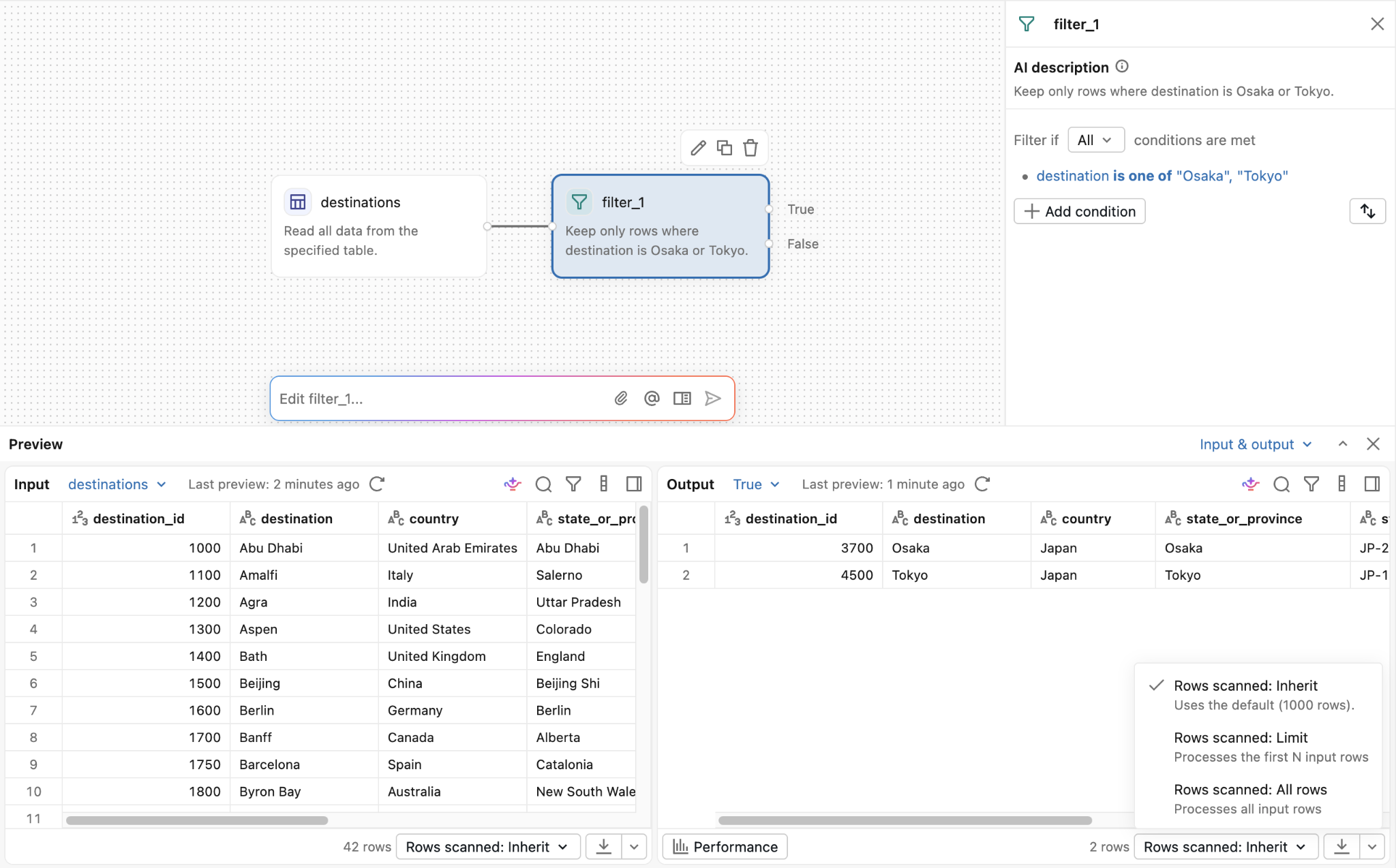
Databricks is the strongest Dataiku alternative for a team whose lakehouse already holds the data. Lakeflow Designer gives analysts a drag-and-drop canvas for filters, joins, aggregation, and reshaping. Genie Code can create or refine steps from natural language.
Generated code sits behind the canvas. Teams can inspect it, version files in Git, and schedule the workflow as a Databricks job. Unity Catalog supplies permissions, discovery, and lineage across the surrounding platform.
Where Databricks works well
- Native execution: Preparation, engineering, SQL, and ML run where Databricks data already lives
- Visible implementation: Lakeflow Designer exposes generated code for each operator
- Shared governance: Unity Catalog covers data and AI assets across the workspace
Where Databricks falls short
Lakeflow Designer workflows deploy through Databricks jobs and tooling. Teams that expect the same preparation logic to run on multiple cloud data platforms need another implementation path.
Designer requires a Unity Catalog workspace and access to compute, and full Excel exports need serverless compute. Analysts write results to Unity Catalog tables, materialized views, or volumes, so the platform team has to grant catalog and compute access first.
Databricks Genie AI only queries clean tables attached to an agent (with a max of 50 table connections). Usage-based pricing also requires a workload estimate before procurement can compare totals.
Bottom line
Databricks becomes the practical choice when the lakehouse already acts as the team's working environment. Another analytics platform adds another bill, control layer, AI limitations, and place to debug when the data, engineers, models, and governance already live in Databricks.
4. DataRobot: Best for governed production AI
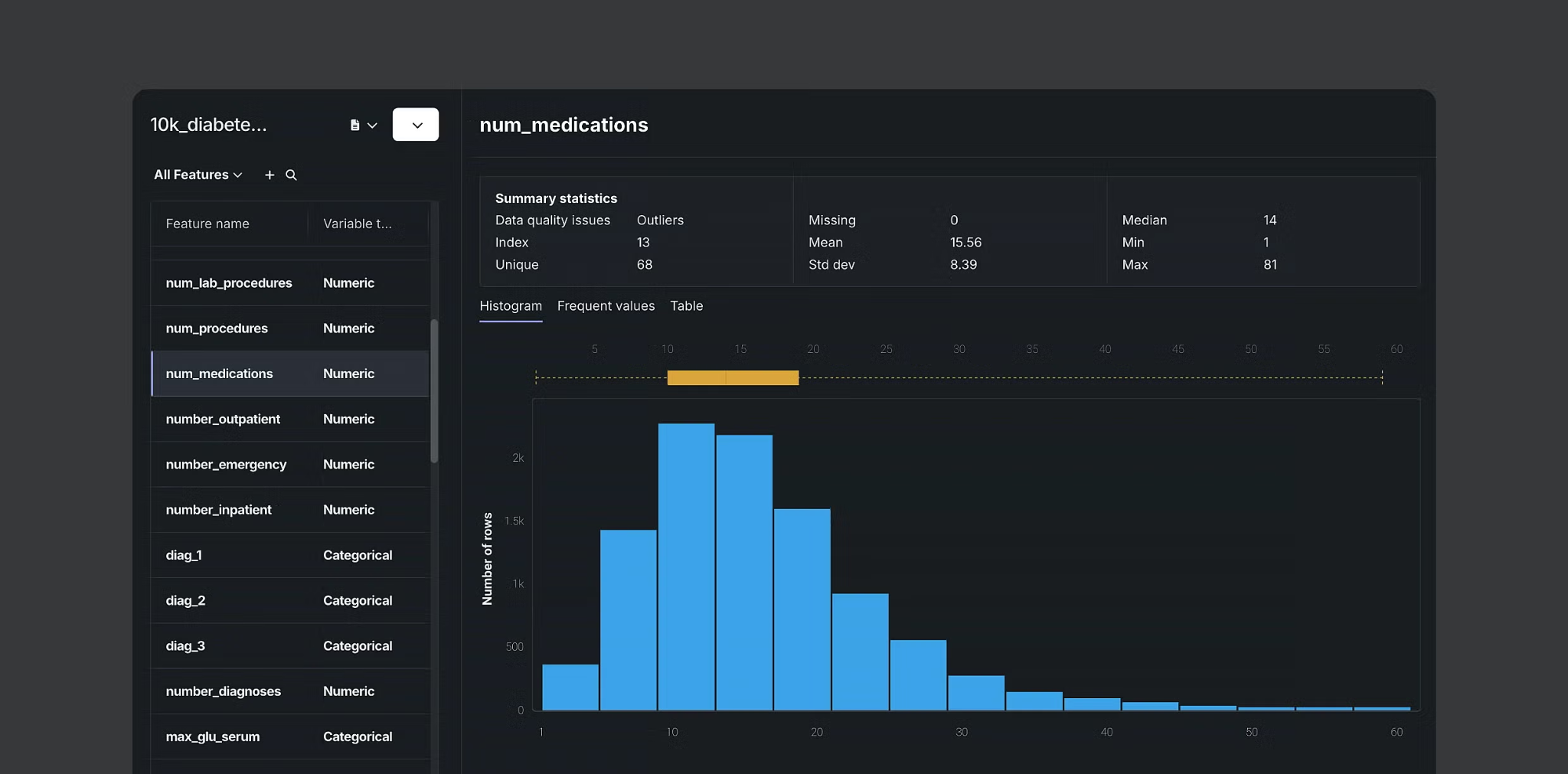
What it does: DataRobot supports predictive AI, generative AI, agent development, deployment, monitoring, and governance.
Best for: Enterprises operating models and AI agents across several teams, environments, or regulatory requirements.
Pricing: DataRobot publishes no price list. Buyers can request a custom quote or begin through the vendor's free trial path.
DataRobot becomes relevant when Dataiku buyers care most about what happens after experimentation. Teams can build agents or bring in agents created elsewhere, deploy them across cloud or private environments, and track production behavior from one control layer.
The platform also keeps its predictive AI roots. Data scientists can build forecasts and predictive tools, then make those capabilities available to agents and business applications.
Where DataRobot works well
- Agent oversight: Tracing and lineage connect outputs with their inputs, tools, and decisions
- Production monitoring: Teams can track service health, data drift, custom metrics, and approval workflows
- Deployment choice: Supported options include public cloud, private cloud, on-premises, sovereign, and air-gapped environments
- Predictive AI: Forecasting and other predictive capabilities can feed agents and business applications
Where DataRobot falls short
DataRobot targets production AI programs with dedicated technical and governance owners. An analytics group seeking visual preparation or recurring reporting may buy more platform than the work requires.
Public plan prices are unavailable, and third-party pricing guides report that cost depends on deployment type, user licenses, compute capacity, and prediction volume, typically under annual contracts.
Data preparation sits inside a larger predictive, generative, and agent platform, so scoping the right modules takes vendor help.
Bottom line
DataRobot becomes easier to justify once models and agents are heading into production across several teams. A department that mainly needs visual preparation or recurring reports will pay for capabilities that become valuable later in the AI lifecycle.
5. KNIME: Best for open visual data science
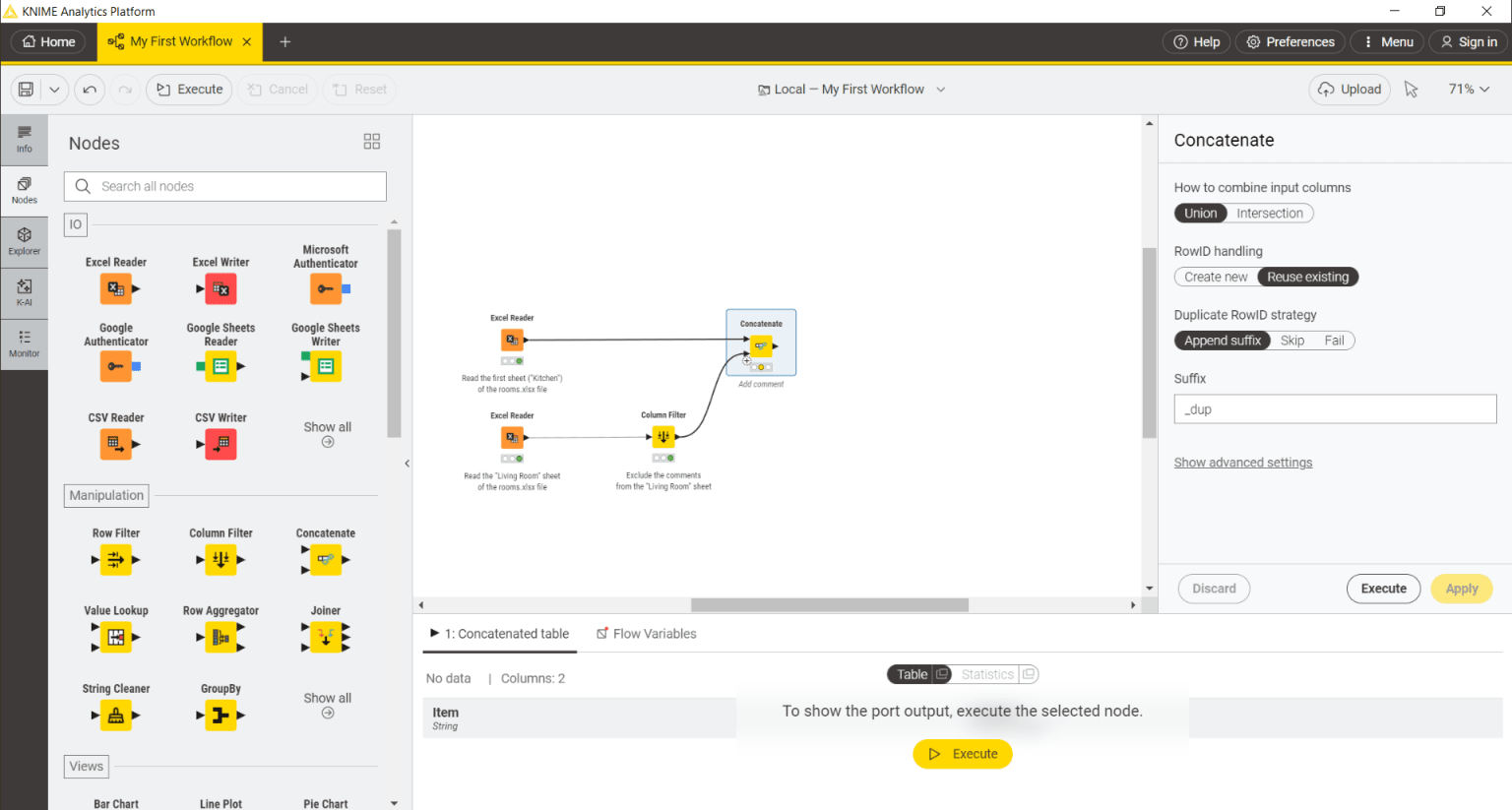
What it does: KNIME Analytics Platform builds local visual workflows for data preparation, analysis, machine learning, reporting, and generative AI.
Best for: Technical analysts and data scientists who want a free local starting point with a paid route to automation and governance.
Pricing: KNIME Analytics Platform is free. Pro starts at $19/month and includes 120 runtime credits. Team starts at $99/month with three members. Business Hub uses custom pricing.
KNIME gives a team room to experiment before a software purchase. The free desktop product connects to more than 300 data sources and services, interleaves visual nodes with code, and writes results to files, databases, services, or reports.
Collaboration changes the economics. Pro adds cloud execution and automation for one person. Team adds private spaces for small companies. Business Hub brings staged deployment, enterprise authentication, permissions, dedicated execution resources, and centralized AI management.
Where KNIME works well
- Free local building: Analytics Platform has no license charge
- Visual and coded work: Teams can place Python or R beside standard workflow nodes
- Broad data coverage: The free product lists more than 300 sources and services
- Graduated adoption: Pro, Team, and Business Hub add execution, sharing, and governance as requirements grow
Where KNIME falls short
The free desktop product keeps workflows local. Shared production execution, governed deployment, enterprise authentication, and centralized administration live in paid Hub products.
Business Hub installs on your own infrastructure, so your IT team runs it, and its pricing is custom. Support for the free product comes mainly from the community forum. Teams should compare the Hub quote with the value of the free authoring experience.
Bottom line
KNIME is where to start when the budget is uncertain and technical users want to prove a workflow locally. Price the Hub tier early if several people need governed execution, because the free desktop experience leaves collaboration and production costs for later.
This KNIME versus Alteryx comparison explores that tradeoff.
6. Altair AI Studio: Best for visual predictive modeling
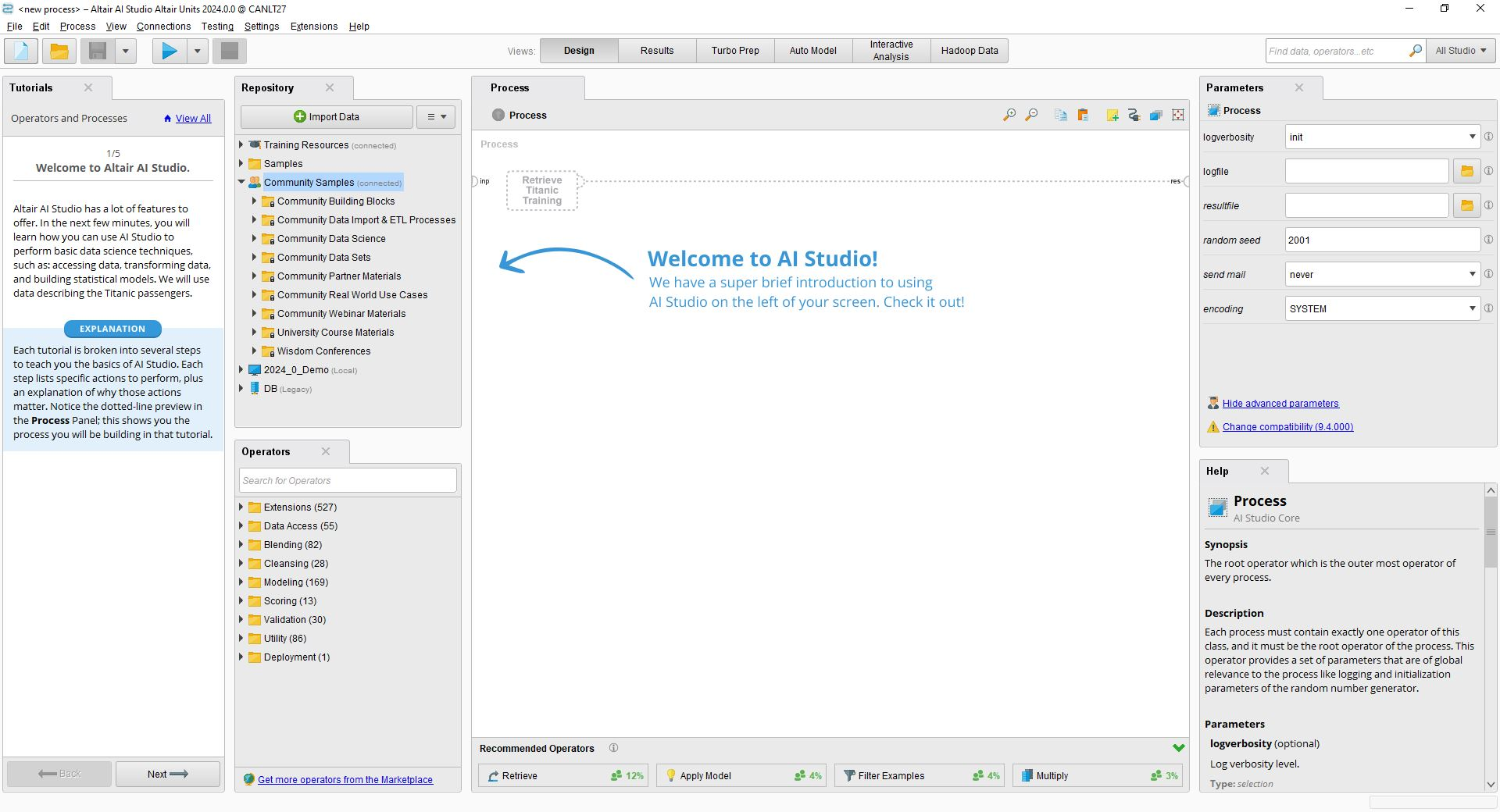
What it does: Altair AI Studio, formerly RapidMiner Studio, provides a visual environment for data preparation, predictive modeling, validation, and deployment.
Best for: Domain experts, citizen data scientists, and coding teams that need predictive models in one visual project.
Pricing: Altair provides a renewable one-year license at no charge for non-commercial use. Commercial Altair AI Studio pricing is unpublished.
Altair AI Studio gives three kinds of builders a shared starting point. A domain expert can use guided visual tools, a citizen data scientist can assemble a drag-and-drop process, and a developer can move into the integrated notebook environment.
The product fits Dataiku comparisons where predictive modeling carries more weight than team-wide analytics applications. Classification, regression, clustering, feature work, and model validation sit close to the center of the experience.
Where Altair AI Studio works well
- Accessible model building: Visual processes guide less technical builders through data science tasks
- Code access: Developers can create custom notebook work and package code for reuse
- Free non-commercial use: Teaching, research, and evaluation can begin without a commercial license
- Predictive coverage: Classification, regression, clustering, feature work, and validation share one project environment
Where Altair AI Studio falls short
Commercial pricing requires a sales conversation, which makes early budget comparison difficult, and licensing runs through Altair Units. AI Studio is a desktop application, so sharing, scheduling, and role-based access depend on the separate Altair AI Hub.
Teams evaluating a broad enterprise AI operating layer should confirm how governance, agent development, and production administration compare with Dataiku. Altair now sits inside Siemens, so ask how the roadmap and support model apply to AI Studio.
Bottom line
Altair AI Studio deserves a place on the shortlist when predictive modeling sits at the center of the purchase and several skill levels need to share the work. Ask Altair to show deployment and governance with your team structure before comparing its quote with Dataiku.
7. H2O.ai: Best for AutoML and enterprise AI
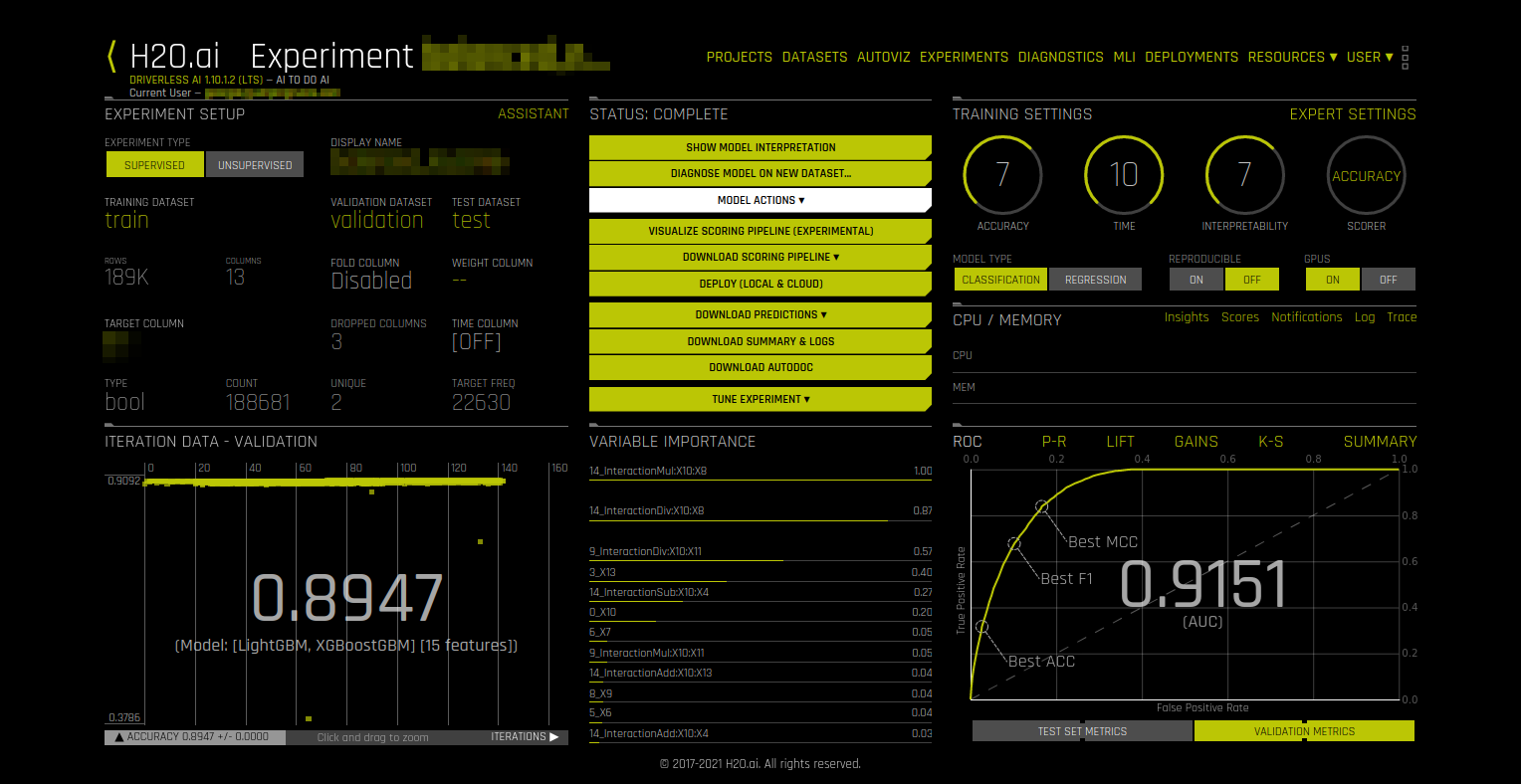
What it does: H2O.ai offers open source machine learning, AutoML, model deployment and monitoring, enterprise GenAI, and AI application tooling.
Best for: Data science teams that want open source experimentation with commercial AutoML and enterprise AI options.
Pricing: H2O-3 is free under the Apache 2.0 license. Prices for Driverless AI, enterprise h2oGPTe, MLOps, and other commercial products remain private.
H2O.ai is a product family, which gives buyers several entry points. H2O-3 provides Apache 2.0-licensed machine learning through Python, R, Java, Scala, or H2O Flow. Driverless AI automates feature engineering, model development, validation, explainability, and deployment.
Enterprise h2oGPTe covers generative AI and agents, while H2O MLOps handles model deployment and monitoring. A buyer needs to map the required products before comparing the package with Dataiku.
Where H2O.ai works well
- Open source foundation: H2O-3 gives technical teams a free path into AutoML
- Automated modeling: Driverless AI covers feature work, tuning, model selection, and interpretability
- Separate enterprise products: Teams can add GenAI, MLOps, feature management, or application tooling as needs grow
- Language choice: H2O-3 supports Python, R, Java, Scala, and the H2O Flow interface
Where H2O.ai falls short
The product family requires more buying decisions than a single-platform comparison suggests. Commercial pricing is private, and business teams may need data science support to choose and operate the right pieces.
Driverless AI needs a license key, and H2O MLOps deploys models to Kubernetes, so platform engineering skills matter. Enterprise h2oGPTe, Driverless AI, and MLOps also ship with separate documentation and configuration, which adds setup work before teams share one workflow.
Bottom line
H2O.ai is a strong route when the team knows it wants AutoML and prefers to assemble the surrounding enterprise pieces over time. Map H2O-3, Driverless AI, h2oGPTe, and MLOps against named owners before comparing the package with Dataiku.
8. Amazon SageMaker: Best for AWS data and AI development
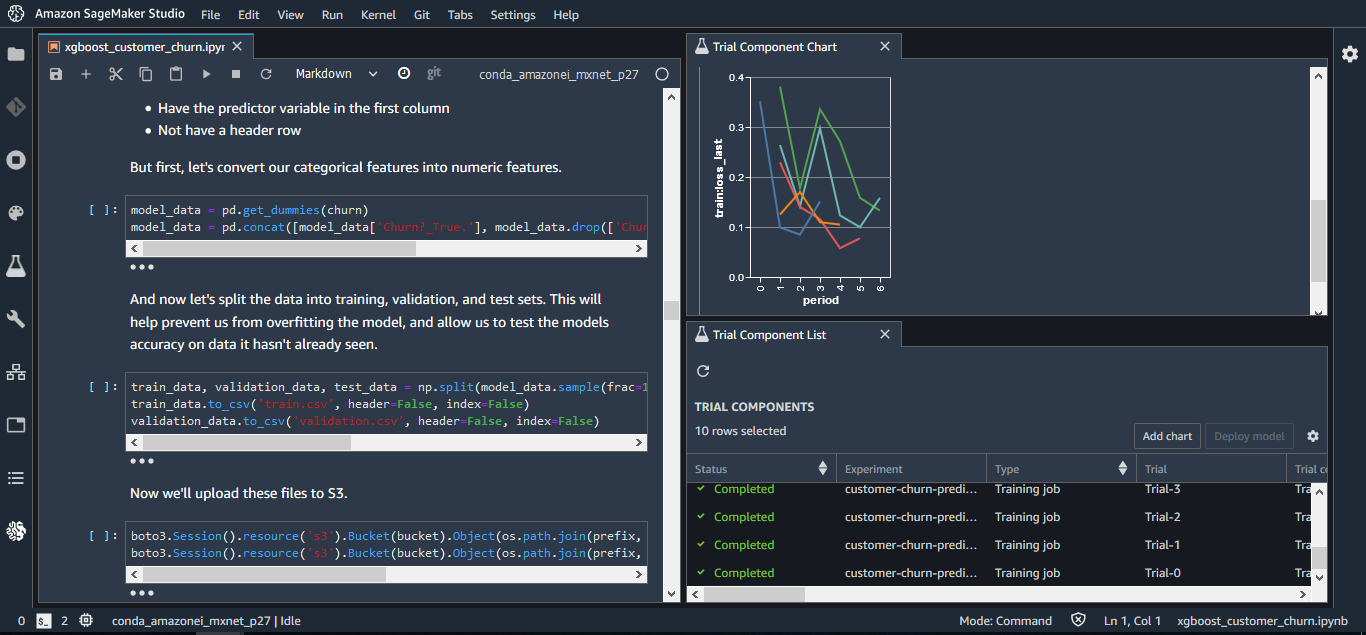
What it does: Amazon SageMaker combines data access, SQL analytics, notebooks, model development, generative AI application work, governance, and machine learning operations.
Best for: AWS teams that want analytics and ML work tied to AWS data, identity, compute, and governance services.
Pricing: SageMaker pricing depends on the AWS services used. SageMaker AI charges for compute, storage, processing, deployment, and MLOps. SageMaker Data Agent costs $0.04 per credit.
SageMaker Unified Studio gives analysts, engineers, and data scientists one development environment. Its notebooks support SQL, Python, visualizations, and natural-language help from SageMaker Data Agent. SageMaker Catalog adds discovery, permissions, and governance.
The machine learning side covers training, tuning, pipelines, endpoints, monitoring, and feature storage. Buyers get detailed infrastructure control, which also makes cost planning more technical than a per-user software quote.
Where SageMaker works well
- AWS-native access: Teams can work with data across AWS lakes, warehouses, and federated sources
- Full ML path: SageMaker AI covers training, deployment, pipelines, model monitoring, and supporting services
- Usage-based entry: Small experiments can begin without purchasing a block of user licenses
- Governed discovery: SageMaker Catalog adds data discovery, permissions, and governance to the development environment
Where SageMaker falls short
Each service contributes its own charge. A production budget may include notebooks, training, endpoints, storage, Catalog, Redshift, Bedrock, and networking. Teams also need AWS expertise for architecture, identity, and cost controls.
Setup starts with a domain that uses IAM roles or IAM Identity Center, and each IAM-based project needs an execution role with specific policies and trust settings. Members of an IAM-based project share the same data and compute access, so finer permissions call for separate projects.
Bottom line
SageMaker becomes the safer bet when AWS ownership is already settled and the team wants detailed control over data and ML infrastructure. If business analysts will build most workflows, include enablement and technical support in the cost discussion alongside compute.
9. Azure Machine Learning: Best for Azure MLOps
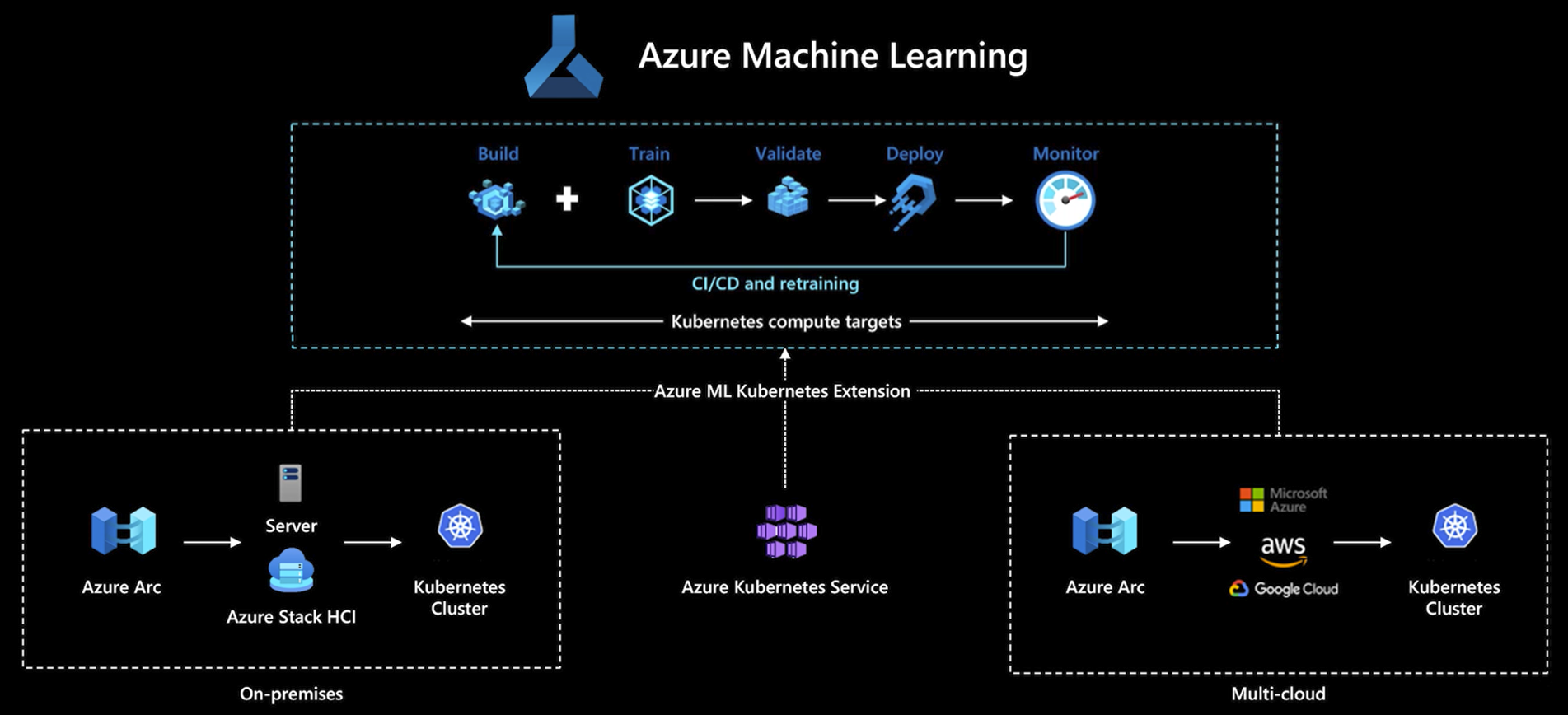
What it does: Azure Machine Learning supports model training, AutoML, managed endpoints, pipelines, experiment tracking, registries, and production monitoring.
Best for: Data science and MLOps teams whose identities, compute, storage, and applications already run on Azure.
Pricing: Azure Machine Learning has no upfront cost or extra service fee. You pay for the underlying Azure compute used for model training and inference, with costs depending on the CPU or GPU machines you choose.
Azure Machine Learning gives technical teams a managed route from experiment to endpoint. Data scientists can work through notebooks and SDKs, while AutoML handles supported model-building tasks with less manual tuning.
The strongest fit comes from the surrounding Azure environment. Compute targets, storage, Key Vault, Container Registry, Application Insights, and networking can follow the organization's existing architecture and purchasing model.
Where Azure Machine Learning works well
- Model operations: Pipelines, registries, endpoints, and monitoring support production ML work
- Azure alignment: Identity, networking, storage, and compute connect with existing Azure resources
- Flexible building: Teams can combine AutoML with code-first development
- Managed deployment: Endpoints give MLOps teams a defined route from registered model to production service
Where Azure Machine Learning falls short
Azure Machine Learning adds no service fee, and creating a workspace also creates a storage account, Key Vault, container registry, and Application Insights instance, each billed separately.
Training and inference compute, monitoring, and networking add further charges, so the total takes forecasting. Securing the workspace in a virtual network requires a Premium container registry and private endpoints for storage.
Business analysts focused on preparation and reporting may find that setup too technical.
Bottom line
Azure Machine Learning belongs on the shortlist when the team already understands Azure identity, networking, and resource management. Business-led preparation and reporting work points more naturally toward Microsoft Fabric, since Azure Machine Learning asks for a more technical operating owner.
10. Tableau Prep: Best for dashboard-bound data preparation
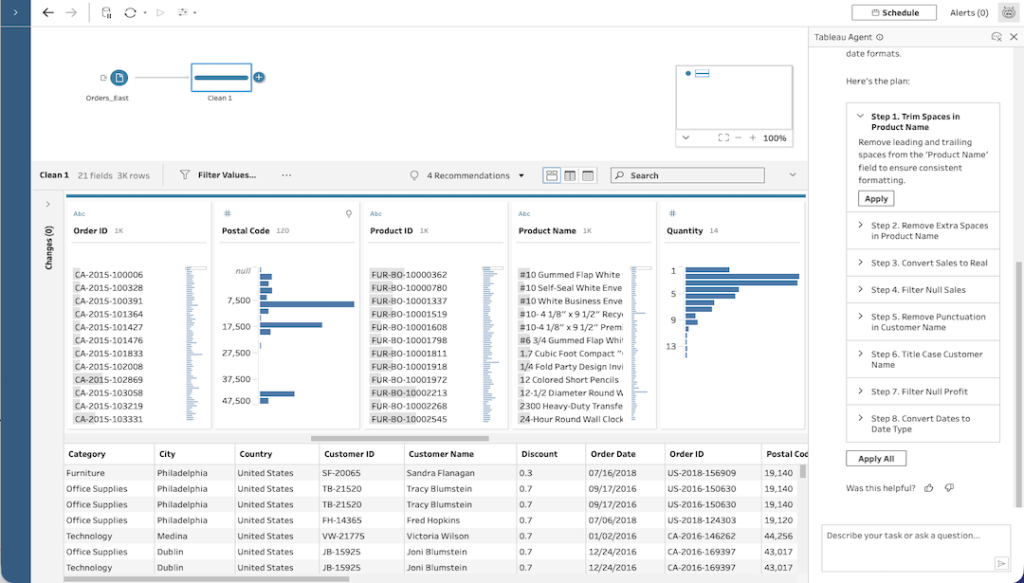
What it does: Tableau Prep Builder creates visual flows for cleaning, joining, reshaping, profiling, and publishing data for Tableau analysis.
Best for: Tableau teams that need repeatable preparation before data reaches a workbook, dashboard, or Pulse metric.
Pricing: Tableau Cloud Standard starts at $15/user/month for a Viewer license, billed annually. The Creator license needed for Tableau Prep Builder costs $75/user/month; every deployment requires at least one Creator license. Tableau Cloud+ and the Tableau+ Bundle require a quote.
Tableau Prep belongs in this comparison when the job ends in Tableau. An analyst can profile columns, correct values, combine sources, and publish the prepared output without introducing a separate data science platform.
Tableau Agent in Prep can assist with cleaning and shaping data. Access requires Tableau Cloud+ or the Tableau+ Bundle, which places the AI feature above the standard Creator plan.
Where Tableau Prep works well
- Visual profiling: Analysts can inspect values and distributions while building each step
- Tableau handoff: Prepared flows can publish datasets and data sources for downstream Tableau work
- Known audience: Existing Tableau creators can add preparation inside a familiar product family
- Repeatable flows: Teams can save cleaning, joining, and reshaping logic for later reporting cycles
Where Tableau Prep falls short
Tableau Prep covers a smaller job than Dataiku. Custom model development, broad MLOps, and enterprise agent creation sit outside its core remit. Scheduling flows or running them through the API requires the Data Management license with Prep Conductor enabled, so recurring refreshes add cost.
AI-assisted preparation also requires a quote-based Tableau edition. Teams that run flows manually can skip that license, though recurring reporting needs a schedule.
Bottom line
Tableau Prep keeps the route short when every prepared dataset ends in a Tableau workbook, dashboard, or Pulse metric. Treat it as a replacement for Dataiku's preparation slice, while predictive models and enterprise AI work will need another home.
11. Microsoft Fabric and Power BI: Best for Microsoft analytics
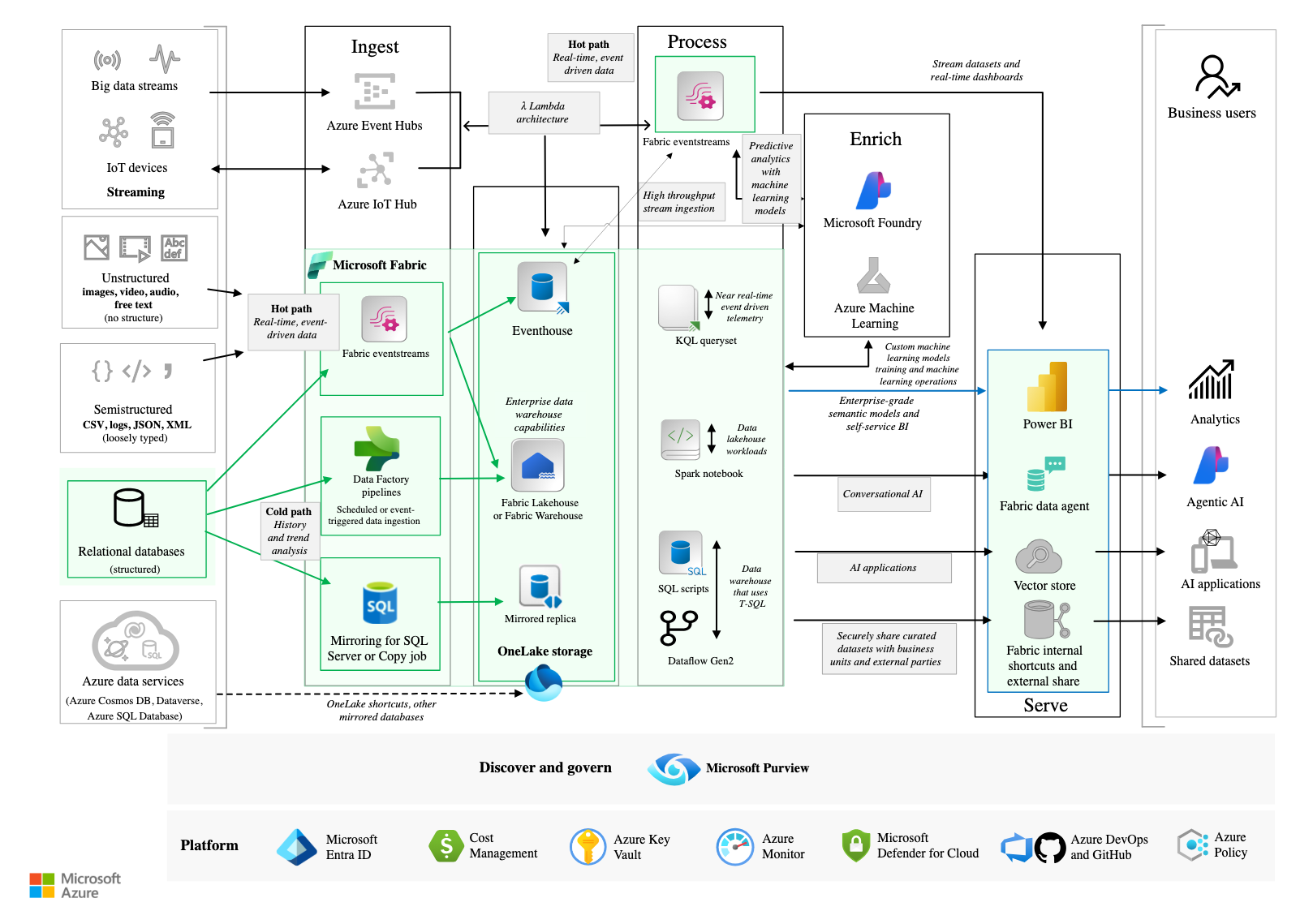
What it does: Microsoft Fabric combines data ingestion, transformation, engineering, data science, warehousing, real-time analysis, governance, and Power BI reporting over OneLake.
Best for: Organizations that want analysts, data engineers, data scientists, and report consumers working inside the Microsoft environment.
Pricing: Power BI offers a free account for report creation. Pro costs $14/user/month and Premium Per User costs $24/user/month, paid yearly. Fabric capacity pricing varies.
Power BI alone covers reporting, semantic models, and preparation through Power Query. Fabric turns the comparison into a broader Dataiku alternative by adding Data Factory, engineering, notebooks, warehouses, real-time workloads, and data science.
OneLake gives the workloads a shared storage layer. Copilot features can help write queries, pipelines, code, summaries, and analysis, subject to the organization's capacity and tenant settings.
Where Microsoft Fabric and Power BI work well
- Broad role coverage: Fabric provides distinct experiences for analysts, engineers, data scientists, and database teams
- Microsoft workflow: Power BI, Excel, Teams, Azure services, and Microsoft 365 sit close to the platform
- Shared foundation: OneLake and the OneLake Catalog support discovery, access, and governance across Fabric assets
- Reporting handoff: Power Query, semantic models, and Power BI connect preparation with business reporting
Where Microsoft Fabric and Power BI fall short
Fabric pricing depends on capacity and workload use, which can make a simple seat comparison misleading. Power BI's free account also stops at report creation. Publishing and sharing require Pro or an eligible capacity arrangement.
On capacities smaller than F64, every viewer still needs a Pro or Premium Per User license, so per-seat costs remain. Microsoft is also consolidating purchase options and retiring the Power BI Premium per-capacity SKUs.
Bottom line
Fabric deserves the first trial when Microsoft is already the shared language across IT, finance, and reporting. Run one end-to-end workload through the capacity model before buying, because the Power BI seat price alone does not show how the broader platform will behave on the monthly bill.
How to choose a Dataiku alternative
Choose a Dataiku alternative by tracing one recurring job from source data to production. Vendor demos become easier to judge when every platform gets the same workflow, users, and review requirements.
Start with the person building the work
A finance analyst cleaning monthly exports needs different controls from an ML engineer deploying a model endpoint.
- Business analysts should prioritize visual logic, reusable workflows, source access, and simple review. Prophecy, Alteryx, Tableau Prep, and Power Query fit this path, and of these, only Prophecy also produces open SQL in your own Git that engineers can read and extend.
- Data scientists and ML engineers need code, experiments, registries, endpoints, and monitoring. Databricks, DataRobot, H2O.ai, SageMaker, Azure Machine Learning, Altair AI Studio, and KNIME cover more of this work.
Match the platform to the job
Broad platforms work well when several teams share data, models, permissions, and deployment controls. Dataiku, Databricks, SageMaker, Fabric, and DataRobot cover more of this operating model.
Focused products fit a defined workflow owned by one team. Prophecy prepares and analyzes data on Databricks, Snowflake, or BigQuery, Alteryx supports analyst-led automation, and Tableau Prep feeds Tableau.
Price the way your team will use it
The starting price rarely tells the full story.
- Per-user plans make budgeting simpler for stable teams using Prophecy (which adds a credit allowance for AI use), Alteryx, Tableau, or Power BI.
- Consumption pricing changes with compute, runtime, storage, credits, or capacity across Databricks, AWS, Azure, KNIME, and Fabric.
- Custom quotes require closer scrutiny for Dataiku, DataRobot, commercial H2O.ai products, Altair AI Studio, and enterprise editions.
Run one familiar workflow
Bring a workflow people already complain about, such as a monthly close, churn model, or dashboard refresh. Ask each vendor to show:
- Source access and credential handling
- Transformation, feature, or model logic
- Code, query, and workflow visibility
- Version control, approvals, and failure recovery
- Production deployment and expected monthly cost
A polished demo can hide the difficult parts. The data preparation tools comparison adds more checks for teams evaluating analyst-led preparation products.
Final verdict
The best Dataiku competitor depends on the job your team needs to own every week. Base the decision on one recurring workflow and the person responsible for getting it into production.
Prophecy fits analyst-built preparation and analysis that runs on your own warehouse, with code your engineers can review. Alteryx fits analyst-led preparation, reporting, and automation. Databricks fits teams already building on its lakehouse.
DataRobot becomes more useful when models and agents need deployment, monitoring, and governance. KNIME offers the easiest free starting point for visual data science. Altair AI Studio and H2O.ai lean toward predictive modeling and AutoML.
SageMaker and Azure Machine Learning suit teams already committed to AWS or Azure. Tableau Prep handles preparation that feeds Tableau. Microsoft Fabric and Power BI cover data and reporting inside Microsoft.
Put the final two options through the same real workflow. One real run tells you more about permissions, review, deployment, failure recovery, and monthly cost than any feature table.
When analysts need a governed path to production
The problem often appears as a growing backlog. Finance needs a revenue dataset, operations needs cleaner customer records, and the data platform team must turn every request into production work.
If analyst requests keep filling your platform team's backlog, request a demo and bring one recurring use case. Our demo will show you how analysts can own the preparation and analysis while your platform team retains control of production.
Frequently asked questions
1. What is the best Dataiku competitor?
The best Dataiku competitor depends on the workload. Prophecy fits analyst-built data preparation on a cloud warehouse, Alteryx fits analyst-led automation, Databricks fits lakehouse data and AI programs, and DataRobot fits governed production AI.
Teams should compare each product against one recurring workflow before purchasing.
2. Is Dataiku or Databricks better?
Dataiku is better for teams that want visual analytics, code, machine learning, agents, and governance in one vendor-neutral workspace. Databricks is better for teams whose data engineering, warehousing, machine learning, and governance already run on the Databricks platform.
3. Does Dataiku publish pricing?
No, Dataiku keeps paid plan prices private. The company offers a self-hosted Free Edition and a 14-day managed cloud trial, while paid editions require a sales quote.
4. What is the cheapest Dataiku alternative?
KNIME Analytics Platform is the cheapest broad Dataiku alternative because its local desktop product is free and open source. H2O-3 is also free for machine learning, while Power BI offers a free account for report creation.
5. Which Dataiku alternative is best for business analysts?
Prophecy is the best Dataiku alternative for business analysts. It builds data prep and analysis visually from plain language, backed by open SQL in your own Git, so it's more flexible than Alteryx's proprietary files and better suited to business users. Alteryx is more established with more connectors, whereas Tableau Prep fits Tableau-centered teams.



