In just two years, coding without AI became unthinkable, turning days of work into minutes.
Prophecy v4, today brings this coding-agent power to business data users for data prep & analysis. Adopting this AI acceleration will be a breakthrough for delivering BI style data analysis and AI alike, changing competitiveness of businesses.
Describe the outcome you want. Prophecy’s AI agents generate visual data workflows you can inspect, refine, and thus trust the results. Work that once took days or weeks now happens in minutes, so teams move from raw data to insight dramatically faster. These workflows are code on git underneath; they run with scale and governance on your cloud data platform.
As AI begins to generate most of the data logic, the problem shifts from generation to validation and trust. Dumping pages of AI-written SQL or Spark code is slow and error-prone to validate.
Text -> Answer (SQL) approach of jumping straight from a question to an answer breaks down because real analysis always requires data manipulations that users must see and verify.
Let’s look a little deeper.
Why data prep is still a bottleneck
Most business data users aren’t programmers.
They start in spreadsheets. As soon as data gets complex—multiple sources, joins, quality rules—they’re forced into ticket queues with central data teams. The result is slow iteration, growing backlogs, and lost momentum.
Visual desktop tools helped. Products such as Alteryx made data prep accessible to millions. But desktop products were built before cloud platforms, before Git, and before AI. Customers now want
- AI-driven productivity with
- cloud scale, enterprise governance, and modern collaboration
Data prep remained the slowest step in analytics. Until now.
Meet Prophecy v4
Prophecy v4 delivers agent-driven data prep & analysis on a visual canvas business users already understand—while running natively on Databricks, Snowflake, and BigQuery.
It is designed to replace legacy desktop tools and unlock a step-change in speed, quality, and scale.
1. AI radically increases productivity
Prophecy applies the same model that transformed software development:
AI agents work with users—accelerating open-ended tasks and automating repeatable ones.
AI-accelerated work (human-in-the-loop)
For iterative data prep and analysis, users collaborate directly with agents.
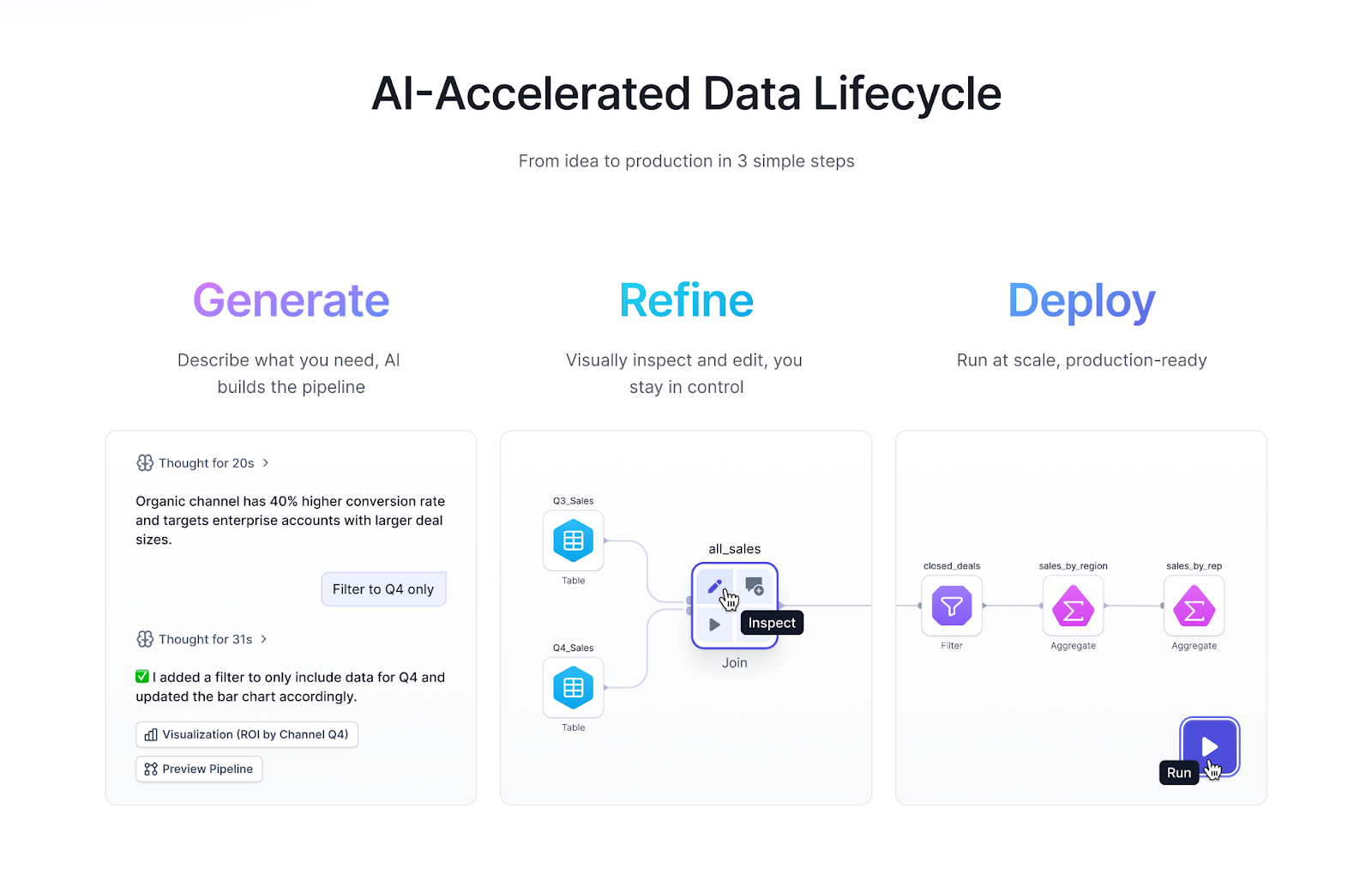
Users describe business intent. Agents generate workflow as code, validate results by compiling and running workflows, and we lift that logic using our compilers into visual components that make sense to business users. Users inspect results visually, refine them instantly, and every change stays in sync with production-grade code underneath.
This tight visual human-in-the-loop cycle is dramatically faster than starting from raw SQL—even for programmers.
AI-automated work (final-human-validation)
For well-defined tasks, Prophecy automates most of the work.
- Harmonization: Define a target data model visually. Agents generate full workflows to map new datasets, surfacing confidence, explanations, and lineage for review.
- Documentation: Agents generate audit-ready documentation from templates, guiding users through review where judgment is required.
The result: hours of manual work reduced to minutes of review.
2. AI collapses the data tool stack
Working with AI is inherently iterative. Users working with AI will move fluidly between:
- asking questions - AI answers with text & tables
- inspecting data - AI helps visualize, slice & dice
- developing & refining logic - AI generates visual data workflows
- operationalizing results - workflows read-write external systems
Today, this flow is fragmented across tools.
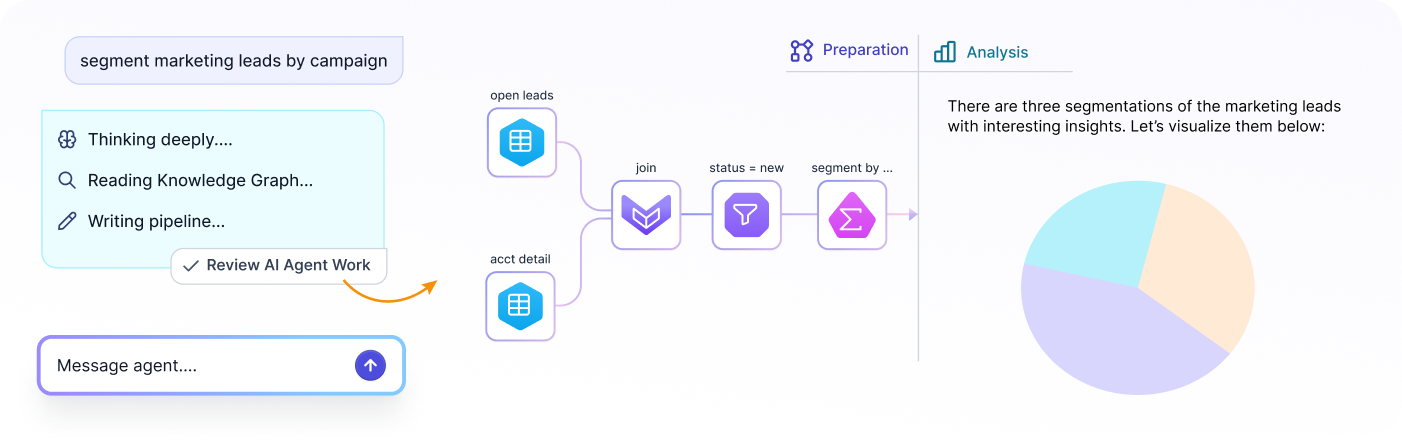
Prophecy unifies data prep & analysis into a single canvas.
Users explore data through AI-generated reports and visualizations, generate and refine workflows visually, receive domain-aware guidance from agents, and push results directly into downstream systems. Insight, preparation, and action happen together—without context switching.
This isn’t just faster. It produces better outcomes.
Let’s see AI applied to marketing segmentation, that shows agent driven workflows for data prep & analysis.
3. Built for trust, governance, scale and production
Prophecy is designed for the realities of enterprise data.
- Native cloud execution on Databricks, Snowflake, and BigQuery
- Open and trusted: visual workflows stored as native code in Git
- Governed: identity, access, and policies inherited from the data platform
- Auditable and reproducible by default
Because workflows are production-grade from day one, business-built logic moves cleanly to platform teams—without rewrites.
Data prep & analysis is entering the agentic era
AI will have more impact on data prep & analysis—arguably even greater than that of code agents in application development.
Why is AI better for data prep & analysis than coding?
- data workflows are smaller and more constrained
- visual inspection accelerates validation
- work is inherently multi-modal
- and AI brings valuable domain context directly into analysis
What is the business impact?
AI doesn’t just make teams faster—it changes what’s possible.
- Marketers can analyze campaign performance and make decisions in real time, without depending on data engineering teams.
- Accounting firms can move audits from months to near-real-time, delivering better outcomes at lower cost. Onboarding customer books, analyzing and transforming them and documenting results can be done many times faster.
- Asset managers can onboard and analyze data from new sources automatically, pushing results straight to dashboards and accelerating investment decisions.
Every data-driven business will need this level of speed to stay competitive. We believe agent-driven data prep & analysis will become the default.
Prophecy v4 is built for that future—starting today.
Appendix: The technology underneath
For a peek under the hood of what it takes to deliver this, we’ll focus on three parts of Prophecy
1. Visual canvas
Prophecy is multi-modal
Business stakeholders, data analysts and engineers can also see the same project in their different view, and edits in any view are reflected in the others. The AI agent works identically across all views

For this post, we’ll focus on the visual canvas - it is designed around three properties:
Intuitive for data analysts
A simple unified canvas where the UI for each component is intuitive, and the workflow is simple to understand and edit. The visual components might invoke different executions underneath - connectors might be running in Prophecy, transformations in data platforms - but the user does not need to be concerned with this, everything works together seamlessly.
Rich data prep operators
A full set of data prep, analysis, and operational operators, including:
- High performance connectors to read from SaaS apps, CSVs from Sharepoint and write to BI tools. We found existing connector performance wanting, and our customers expect much better, so use bulk APIS, pushdown to sources when possible and write extremely tight code to deliver data fast and reliably
- Transformations that match common data-prep patterns (e.g., Alteryx-style shaping and joins)
- Operational steps like notifications and email actions
Visual ↔ code incremental compiler
In Prophecy, the visual workflow is the code. Every change in the visual canvas is reflected immediately in code—and vice versa. Under the hood, an incremental “language-server-like” compiler continuously recomputes schema, lineage, and downstream impacts. For example, adding a new [column ← expression] updates the output schema and automatically propagates schema and lineage changes through the rest of the workflow.
2. Data execution
Prophecy chose two different execution platforms for speed and for production-scale.
Natively on your data platform
Workflows can also execute directly on Databricks, Snowflake, or BigQuery and you can seamlessly switch across platforms - our customers often have multiple ones. “Native” means we generate high performance platform-correct code that matches the best hand-crafted code. We use platform independent Prophecy-IR that makes transitions across data platforms instant. We use each platform’s APIs, and integrate with its governance and identity model—so execution respects your existing security, permissions, and controls.
In Prophecy’s execution pod
We wanted to match desktop performance for ad hoc workflows and cloud data platforms are often slower and quite expensive when you have thousands of analysts using it every day. In this pod, we run connectors plus an embedded DuckDB engine for fast local exploration, profiling, and visualization. This engine runs the entire workflows and performs the best at ad hoc tasks, and with data sizes under 500GB.
3. AI agent loop
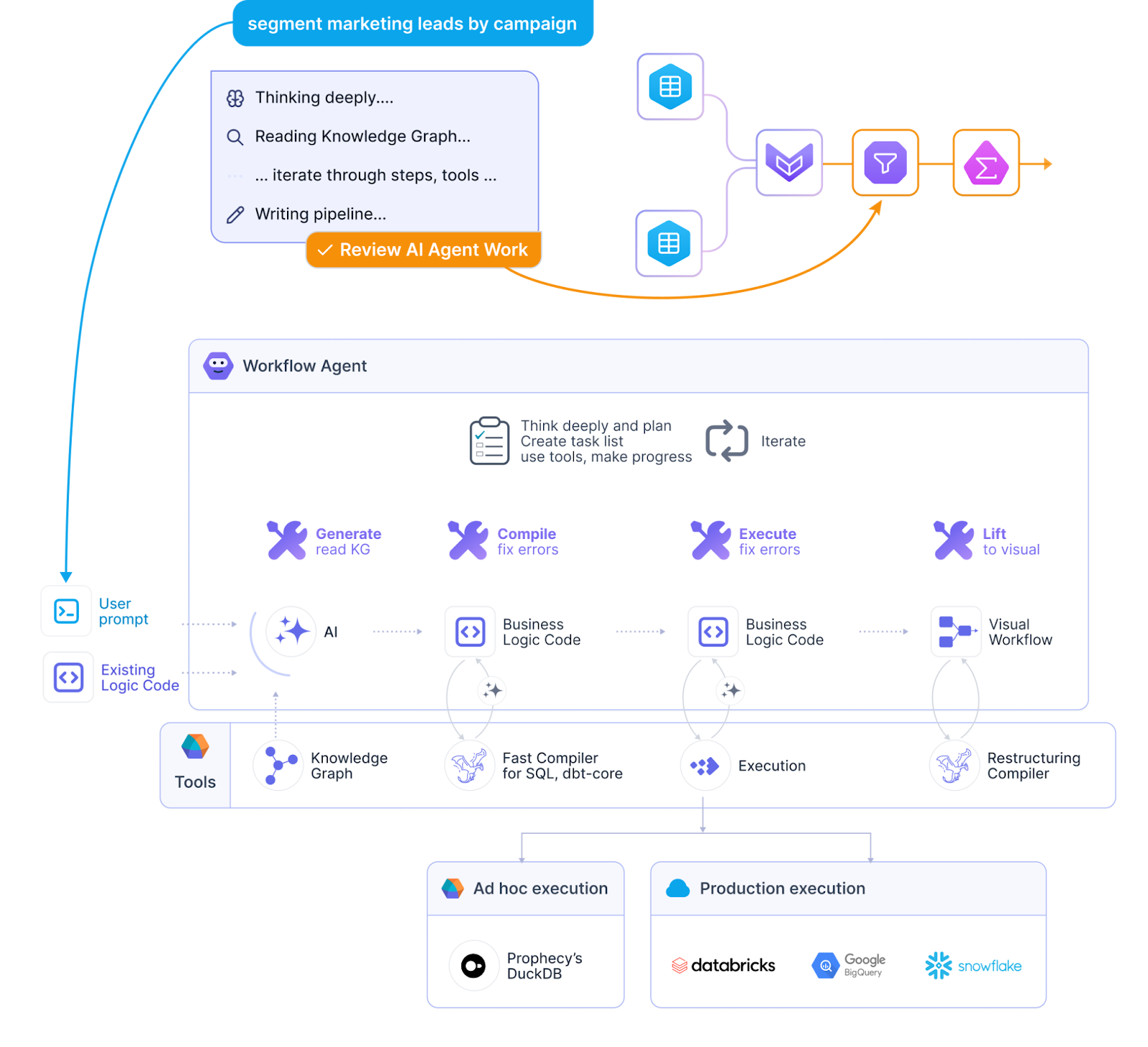
Prophecy uses specialized Claude Code agents. Each agent has its own system prompt, tools, and skills. Some run as sub-agents under a primary workflow agent to keep context clean and maintain specialization.
- User prompt
The user asks for a business task—for example, “segment marketing leads.” - AI Agent iterates picking the correct tools, steps as needed
- Generate logic using:
- existing project logic (as code)
- business documentation
- an enhanced interpretation of the user’s prompt
- Prophecy’s knowledge graph (schemas, field definitions, relationships, business metadata)
- existing project logic (as code)
- Compile
The generated code is compiled against the target platform, and compilation errors are iteratively resolved. - Execute
The workflow runs, and runtime issues common in messy real-world data (types, nulls, unexpected values) are detected and fixed. - Lift to Visual
A restructuring compiler converts the final code into visual components available in the user’s project—using built-in blocks and any extension libraries the customer has added. It also lifts technical constructs (e.g., window functions) into understandable business semantics (e.g., time-series analysis patterns).
- Generate logic using:
- Inspect and refine
Prophecy highlights exactly what the agent changed. The user can step through changes one by one, inspect business logic, and view before/after data at each step. The user can then refine visually to ensure the workflow precisely matches intent and can be trusted.
What does production-ready mean for an analyst-built workflow
Production-readiness requires evidence. An AI-drafted workflow has to clear the same four bars as a hand-coded one:
- Automated testing. Data integrity checks for type, format, range, and consistency are confirmed before the workflow leaves the refine step.
- Observability. End-to-end visibility into data flows, so the analyst hears about a bad result before a downstream consumer does.
- Version control and CI/CD. Rollback and traceability that separate a workflow from a liability, backed by standard operational excellence practices.
- Documentation. A version history record and automatic documentation are available, so stakeholders can review and approve as well.e.
When an agent drafts a visual workflow and the analyst refines it, those four requirements are automatically met because the workflow deploys via engineering-grade infrastructure.
Our workflow agent not only works with data transformation as detailed above, but works with our connectors to external systems, operational tasks such as writing emails, and with analysis - text, table and visualization to drive insights. We’re excited about how nicely the system has come together. To see agentic data preparation on your own data, book a demo.